Built for WordPress businesses

NXT Cloud Chat

The self-hosted WhatsApp CRM for WordPress. Run your business inbox, OTP login, contacts, Access Teams, tickets, sales pipelines, deals, and automation from one connected workspace.

Direct Cloud APIYour WordPress site connects to Meta.
Self-hosted CRMCRM records remain in your database.
Developer-readyStable wrappers, hooks, and contracts.
Official Cloud API
WordPress-hosted data
Team access controls
Secure webhook handling
Extensible runtime API
One workspace

WhatsApp CRM in Free. Campaigns and automation in Pro.

Manage conversations, customer records, sales opportunities, teams, and verified login in WordPress. Add Pro for targeted messaging, WooCommerce workflows, recovery, and advanced reporting.

01

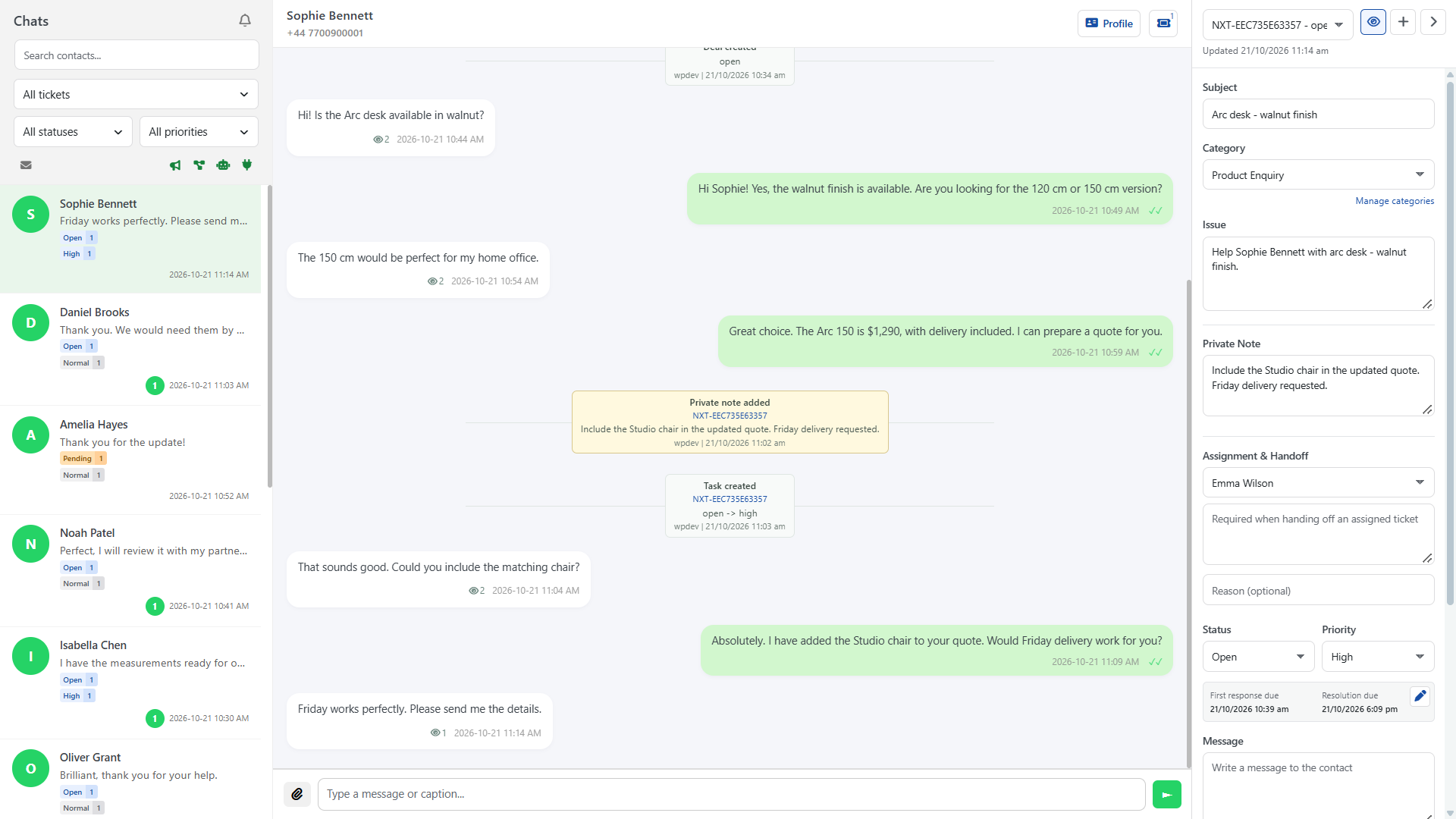
Shared WhatsApp Inbox

Keep the conversation and customer context in one WordPress workspace.

  • Send replies and access message attachments securely.
  • Reply context, reactions, text formatting, and media captions.
  • Incoming button, list, and Flow response rendering.
  • Agent attribution and workflow, broadcast, system, and integration source indicators.
02

Tickets and Private Notes

Create tickets explicitly when a conversation needs an issue to track.

  • Multiple tickets per contact, categories, subjects, issues, status, and priority.
  • Followers, user or team assignment, and shared handoff notes.
  • Author-only private notes while the author retains access.
  • Save without sending, or Save & Send within the reply window.
03

Inbox Views, SLA and Agent Views

Find the work that needs attention and see who has viewed a message.

  • All, Mine, Team Queue, Unassigned, Overdue, and Recently Resolved views.
  • Multi-select assignment, status, priority, and Following filters.
  • Message-source and Unread-only filters; unread customer replies stay eligible.
  • Response/resolution SLA targets and unique Viewed by receipts with first-view times.
04

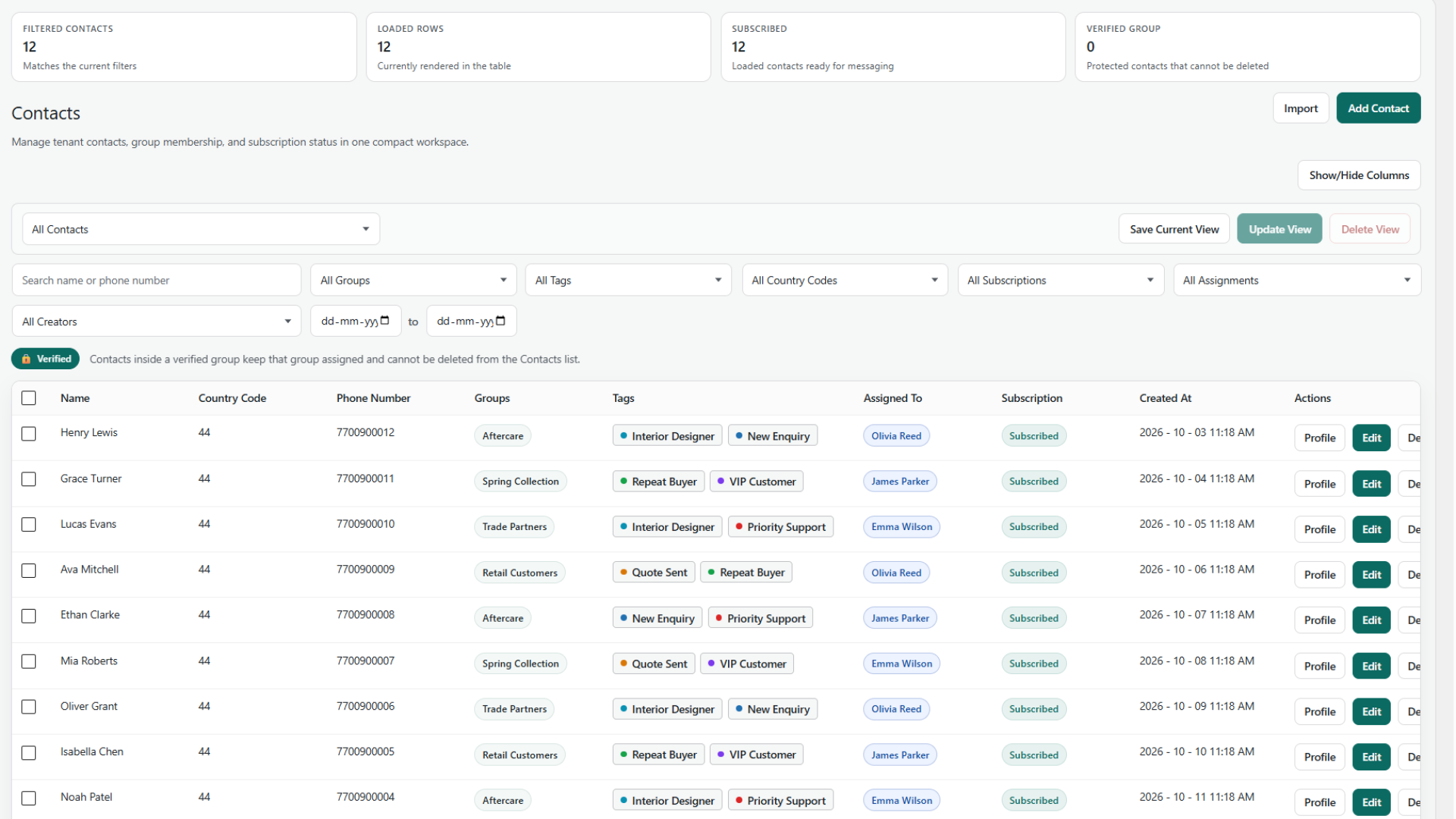
Contacts and Customer Profiles

Build a customer record around each WhatsApp relationship.

  • Phone, country, name, custom fields, and subscription status.
  • Unsubscribe reasons and permission-checked CSV imports/exports.
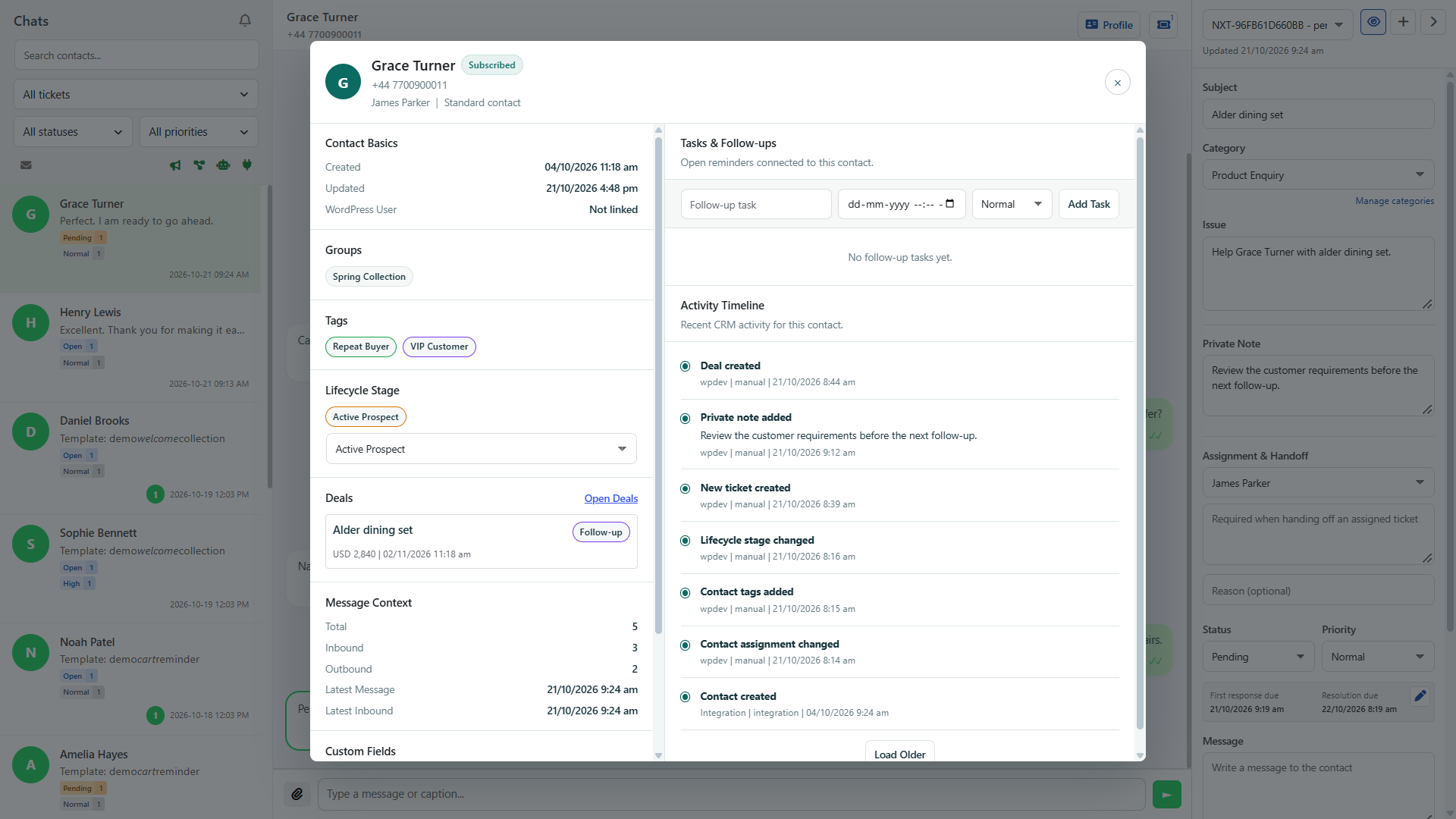
  • Profiles with message context, ownership, tasks, and linked deals.
  • Customer activity timelines from Contacts or the inbox.
05

Groups, Tags and Lifecycle

Organize customers in ways that reflect your business.

  • Manual and bulk group membership, with verified-group protections.
  • Color-coded tags, descriptions, imports, and bulk assignment.
  • Any, All, or None tag filtering and tag names in exports.
  • Tenant-managed lifecycle stages for leads, prospects, and customers.
06

Follow-ups and Record Quality

Give each customer a clear owner and a useful next action.

  • Contact ownership and follow-up tasks.
  • Personal saved contact views and bulk actions.
  • Duplicate suggestions and confirmation-based contact merging.
  • Activity history for changes and follow-up context.
07

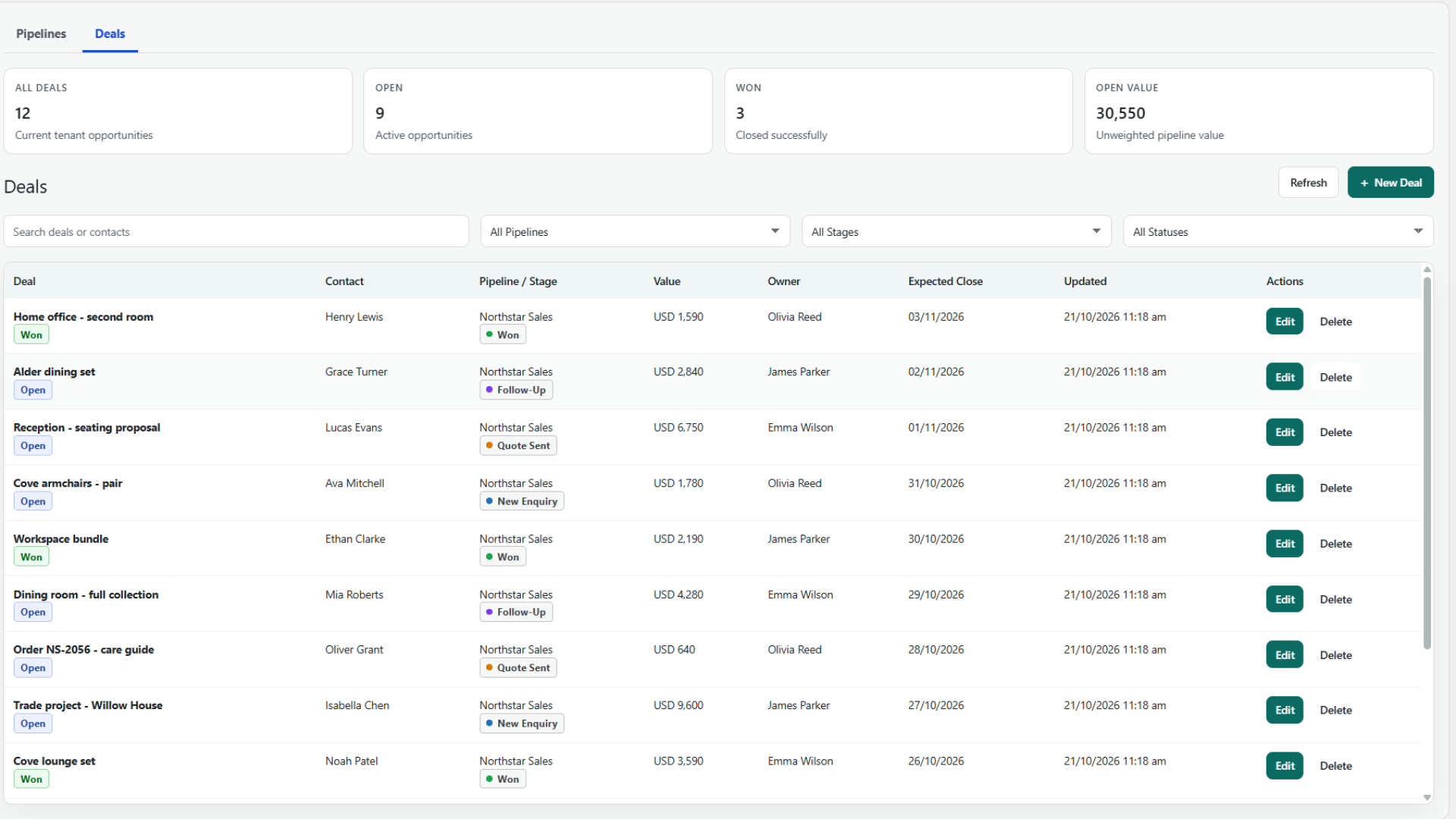
Sales Pipelines and Deals

Track sales opportunities without a separate CRM subscription.

  • Custom stages, colors, ordering, and required stage reasons.
  • Owners, priorities, values, expected close dates, and linked contacts.
  • Manual or calculated values with deal line items.
  • Stage history, duplication, and guarded archive/delete actions.
08

Access Teams and Permissions

Control what each WordPress user can see and manage.

  • Custom Access Teams and assignment eligibility.
  • View-only or manage access for individual modules.
  • Assigned, team-queue, or all-record scopes.
  • Record access enforced across inbox, CRM, imports, exports, media, and forwarding.
09

WhatsApp OTP Login

Offer passwordless WordPress and WooCommerce My Account login.

  • Login shortcode, country selection, OTP delivery, and phone verification.
  • Optional WordPress login-page and My Account buttons.
  • Verified-user CRM sync, migration options, and optional COD checkout login checks.
  • OTP length, cooldown, allowed countries, colors, button text, and branding controls.
10

Optional Browser Notifications

Get incoming-message alerts without requiring Pro.

  • Explicit per-browser opt-in, bound to the WordPress login session.
  • Assigned/team or all-accessible audiences, independent of inbox filters.
  • Shared unread counts, plugin logo, and optional previews off by default.
  • Encrypted subscriptions, grouping, retries, duplicate suppression, and logout revocation.
11

History and Data Controls

Review message evidence and manage operational retention.

  • Inbound/outbound history with contact, date, direction, and status filters.
  • Timestamps, template context, delivery receipts, and read status.
  • Read-only cleanup previews, manual cleanup, and scheduled retention.
  • Dedicated Web Push cleanup and optional data deletion on uninstall.
12

Connection, Health and Security

Connect directly to Meta using your own business credentials.

  • Connection, Messaging, and Calling Health status diagnostics.
  • Callback URL, Verify Token, App Secret signature checks, and test sends.
  • Server-side credentials, encrypted at rest when supported.
  • Setup links, support-badge preferences, and server diagnostics.

These features are included in Free. Pro is not required for the CRM, pipelines, team permissions, OTP login, or browser alerts. External line-item sources depend on the compatible integrations installed on your site.

Team operations

Every customer record can reach the right owner.

Keep contact ownership, ticket handling, tasks, and deals connected. Free provides manual assignment and access controls; Pro adds workflow routing, deadline automation, and escalations.

01

Receive and qualify

Review the conversation and customer profile. Create a ticket explicitly when there is an issue to manage; ordinary chats do not create tickets automatically.

InboxContactsLifecycle
02

Assign by person or team

Choose an eligible member or Access Team queue. Pro workflows can route work using round-robin or least-busy rules through the shared assignment runtime.

UserAccess TeamQueue
03

Keep private and shared notes distinct

Private notes stay author-only while the author retains access. Handoff notes and authorized workflow team notes carry shared context between handlers.

NotesTasksSLA
04

Resolve, follow up, and measure

Use response/resolution targets, tasks, ticket activity, and deal history in Free. Pro reporting brings CRM workload and automation results into the dashboard.

HistoryDealsAnalytics
Pro automation

Build flows that understand CRM context.

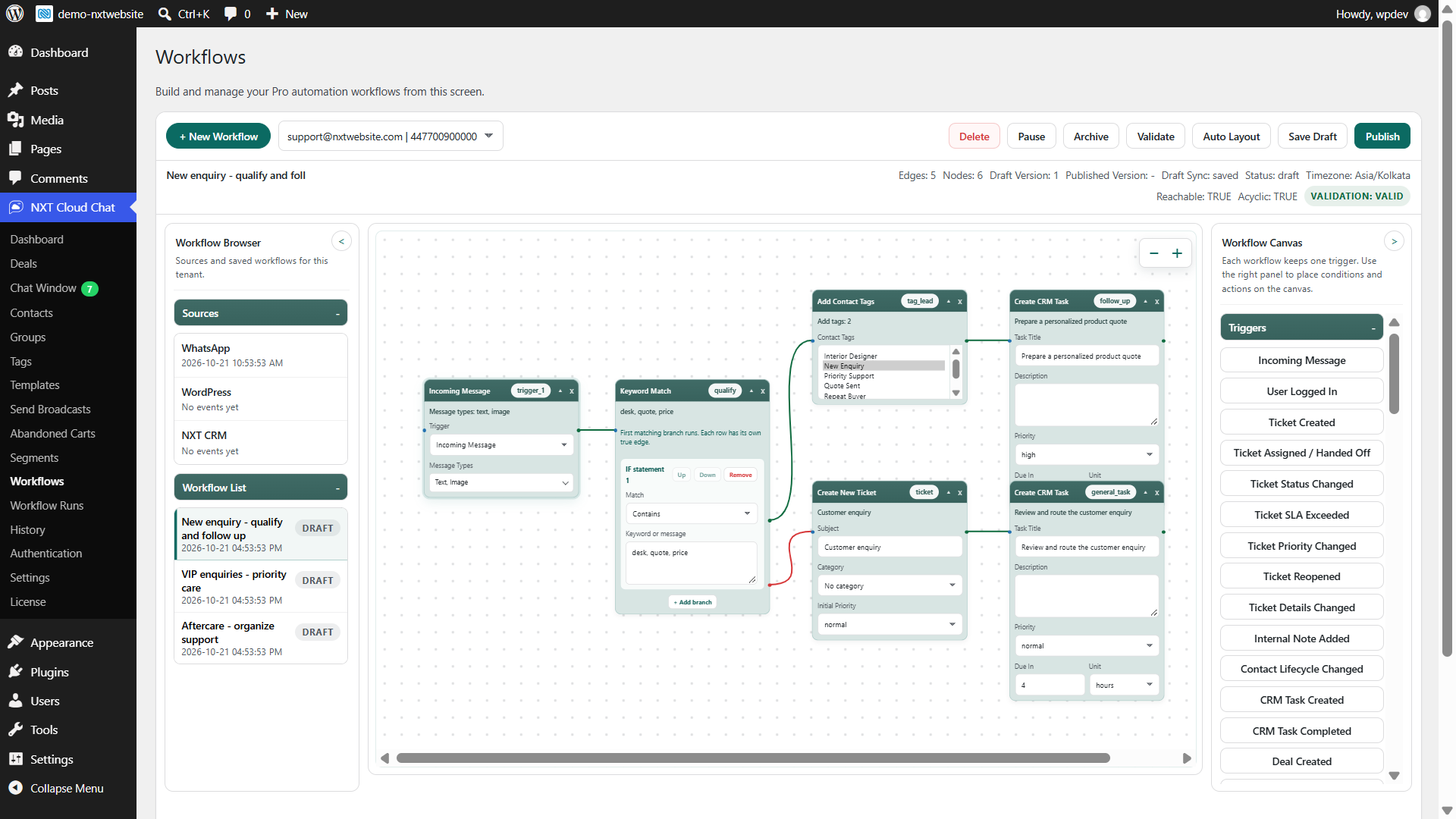
Start from a message, login, customer change, ticket deadline, deal update, order, or abandoned cart. Branch on the current context, validate the flow before publishing, and inspect execution independently of message delivery.

Trigger

Cart abandoned

Cart and contact context enter the workflow.

Condition

Currently subscribed?

Check the contact's current subscription status.

Condition

High-value segment

Use CRM and WooCommerce audience rules.

Action

Send recovery template

Queue an approved message with cart tokens.

Context-aware validationTicket, deal, order, and contact actions require the context they use. Ticket conditions never create tickets as a side effect.
Delays, queues, and retriesReview scheduled work and failed steps. A queued or accepted message is not a confirmed delivery.
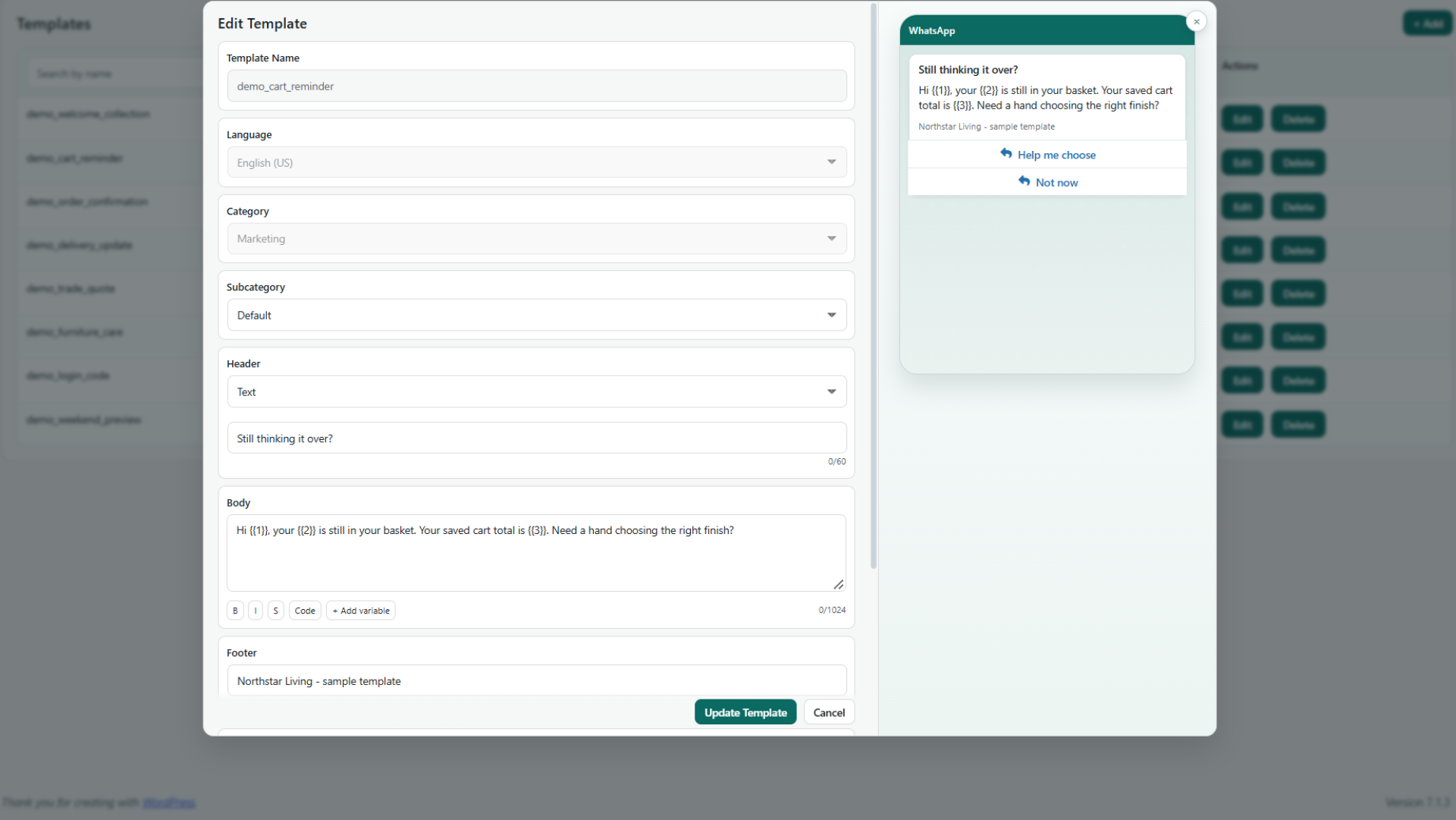
Protected outgoing valuesMask selected new template parameters in the inbox without changing the customer's message.
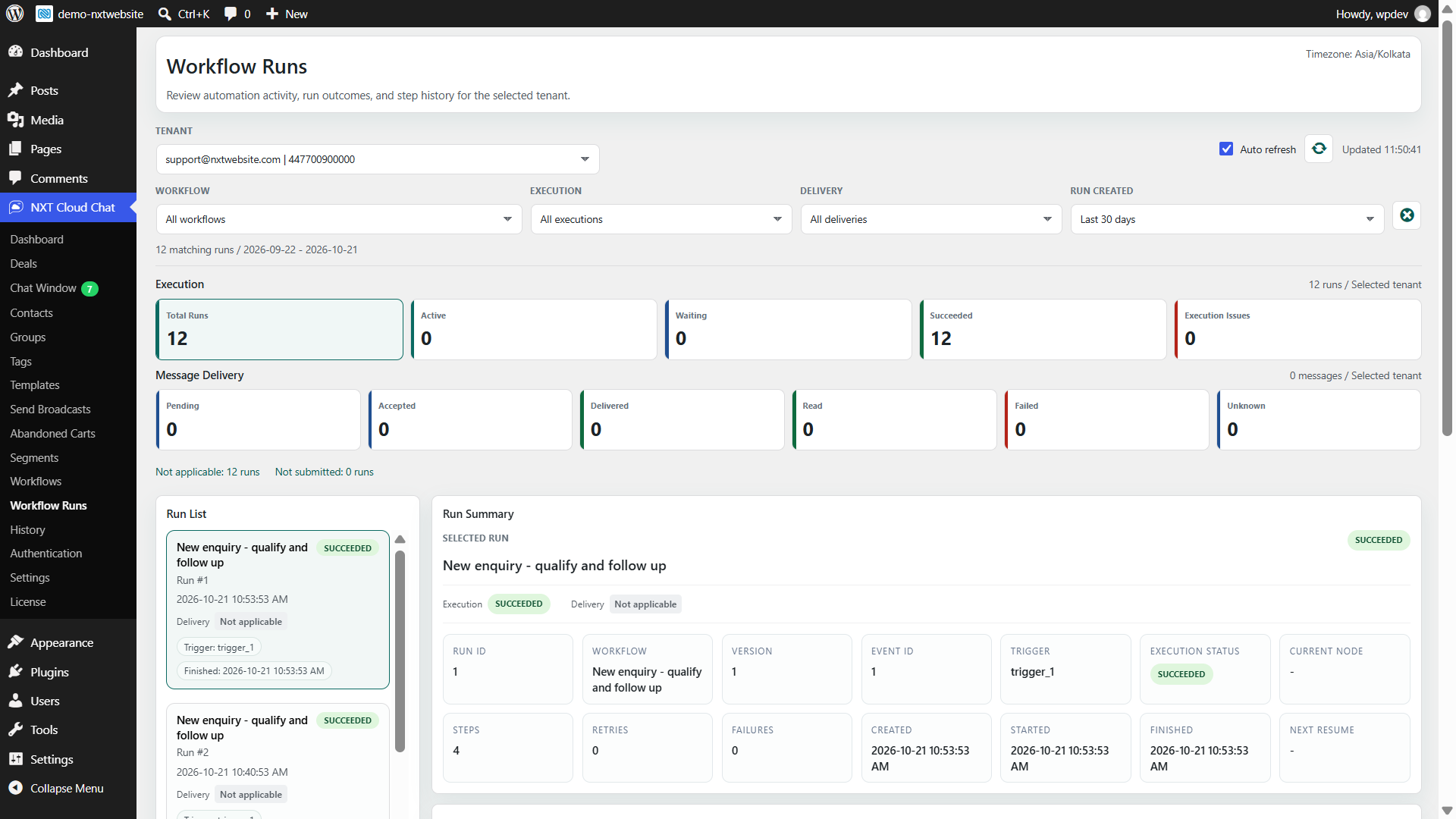
Execution and delivery, separatelyRun outcomes, accepted messages, delivery receipts, reads, and failures remain distinct in Workflow Runs.
Built for real teams

One customer workspace for support, sales, and commerce.

Use the same contact identity and conversation history across support, sales, commerce, and authentication.

Customer Support

Free combines a shared inbox, explicit tickets, author-only private notes, shared handoffs, followers, SLA targets, agent views, and optional browser alerts.

Sales CRM

Lifecycle stages, deal pipelines, expected close dates, line items, stage reasons, activity, and follow-up tasks.

WooCommerce

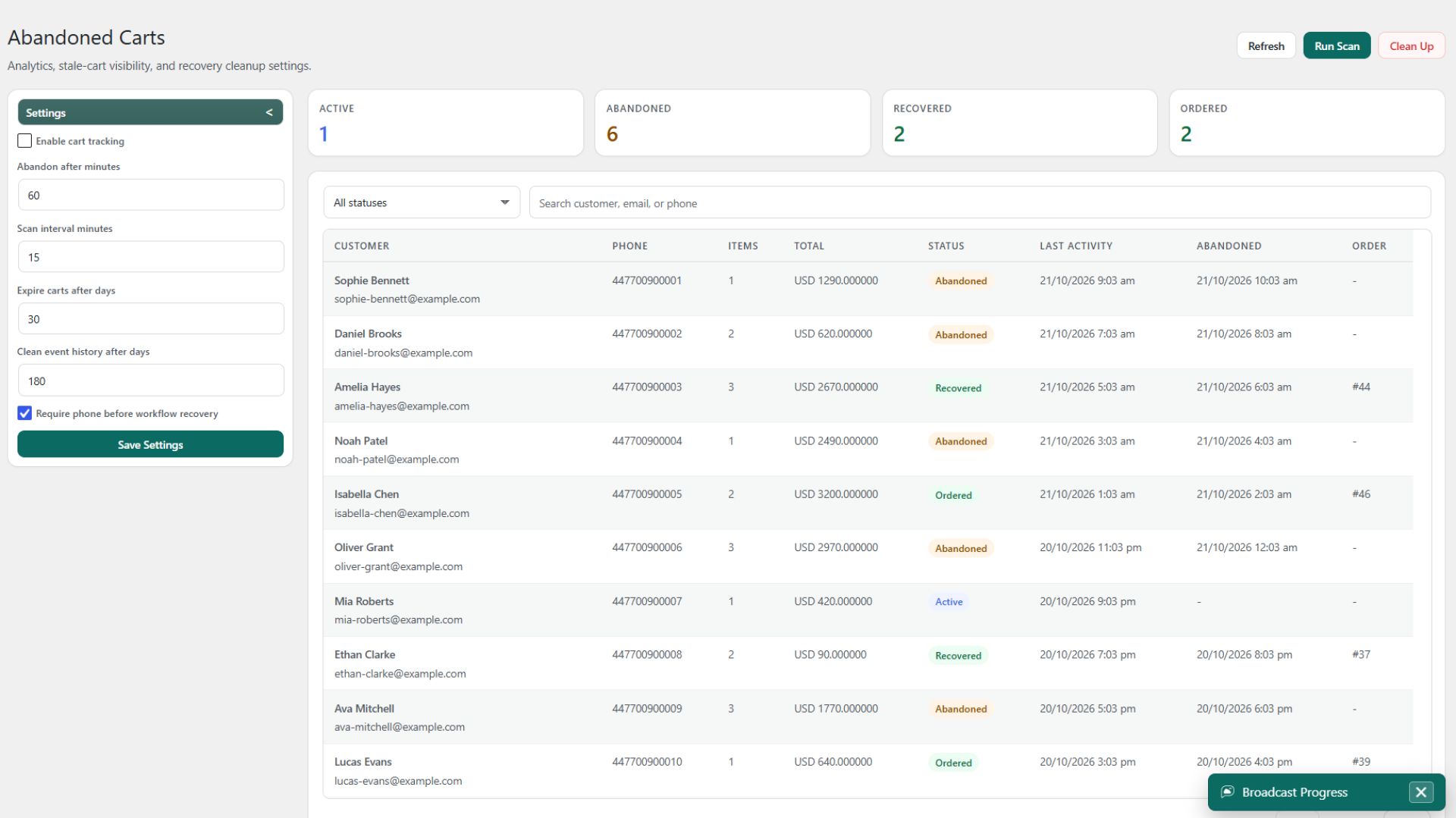
Pro adds order communication, verified-contact and payment-method conditions, commerce segments, and abandoned-cart recovery workflows. Store processes determine results.

Passwordless Login

WhatsApp OTP for WordPress and WooCommerce with verified phone linking, migration options, and configurable UI.

Inside the product

Customer context and outcomes, in the same workspace.

Review the customer record, build audiences, send broadcasts, create workflows, and understand the workload. Open any screenshot to inspect it at full resolution.

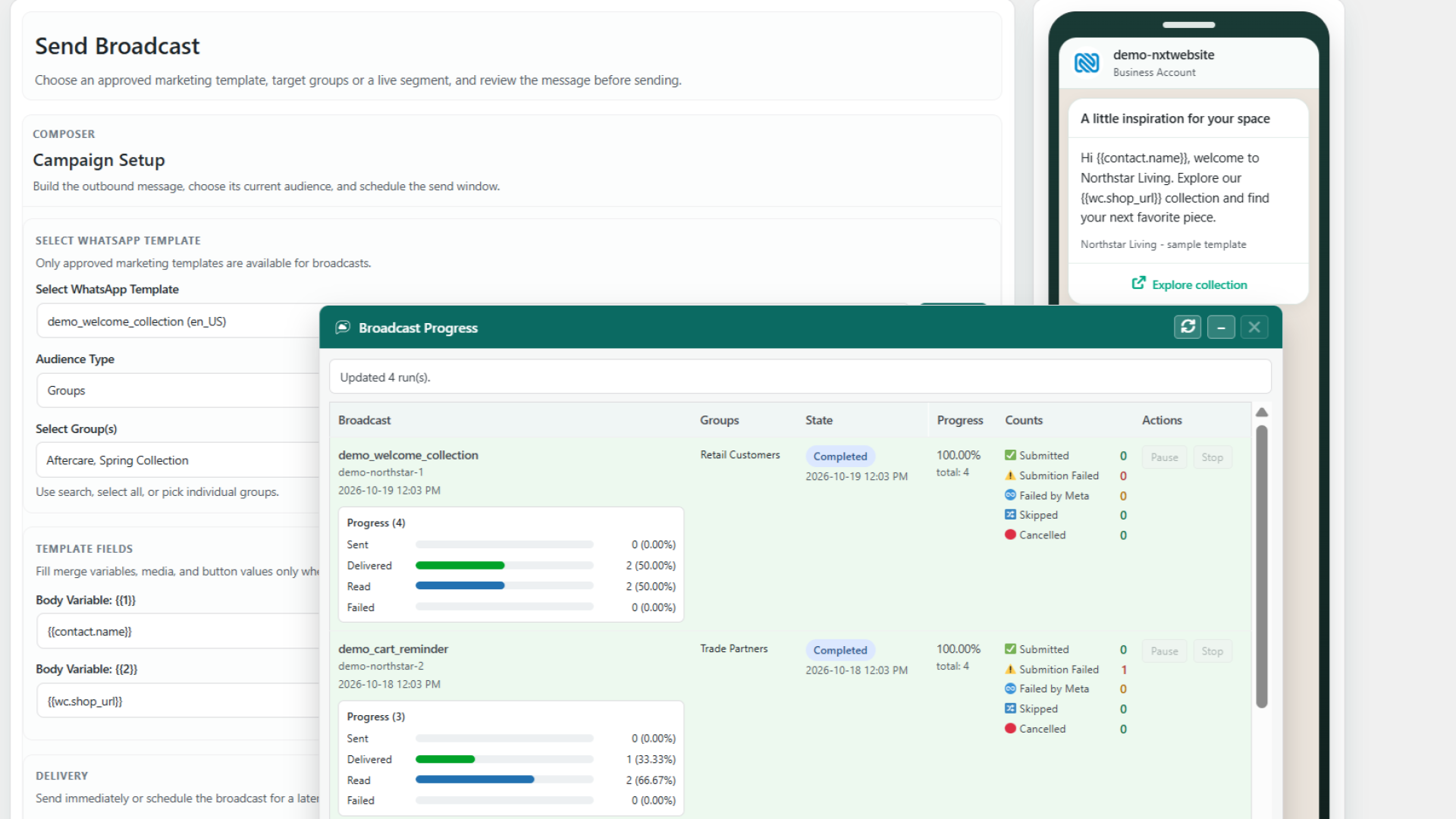
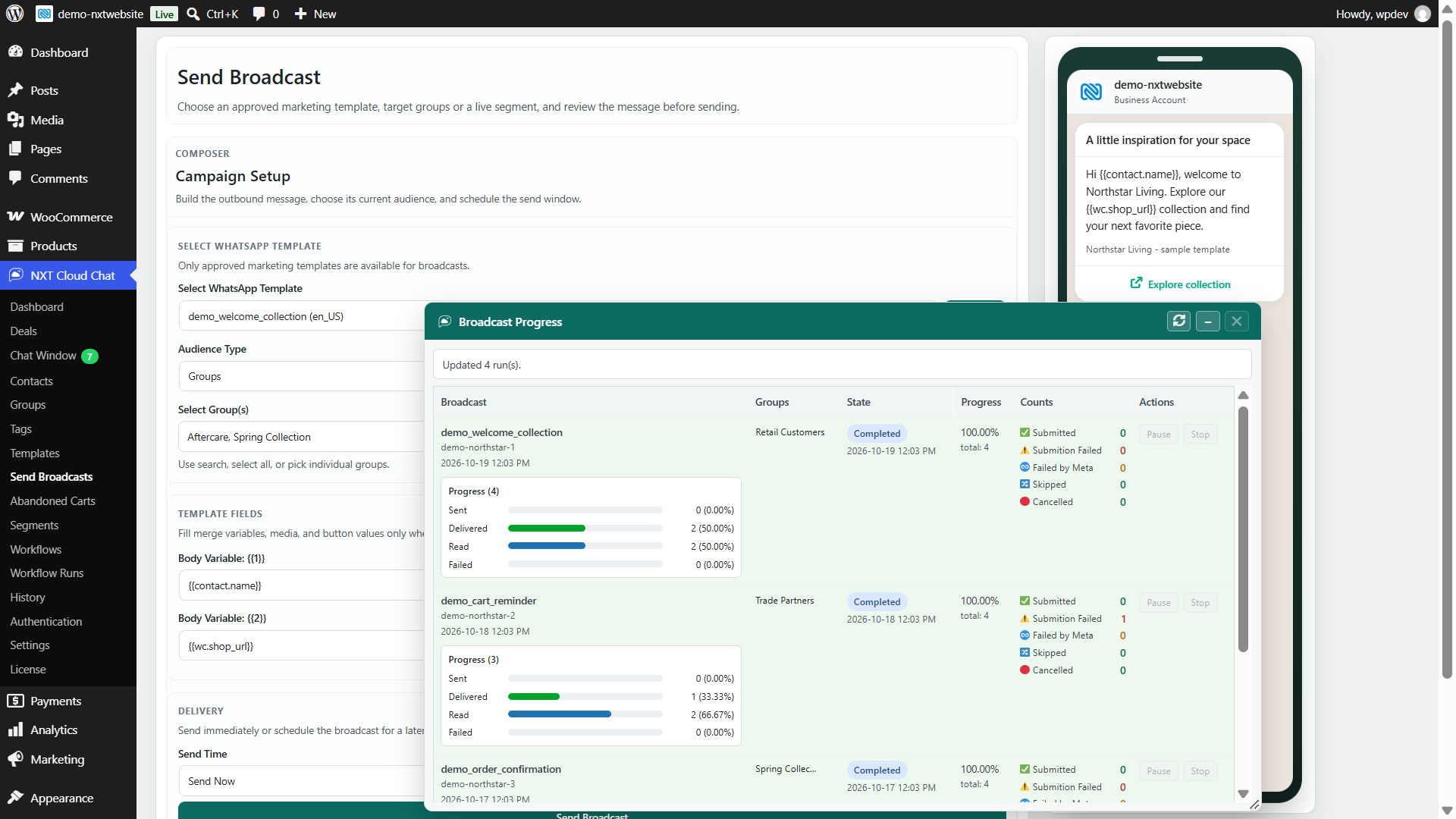
NXT Cloud Chat Pro Send Broadcast screen in WordPress admin with template personalization, target groups, message preview, and campaign progress
Send broadcasts and track campaign progressAvailable in Pro. Personalize approved templates, choose an audience, and review message outcomes.
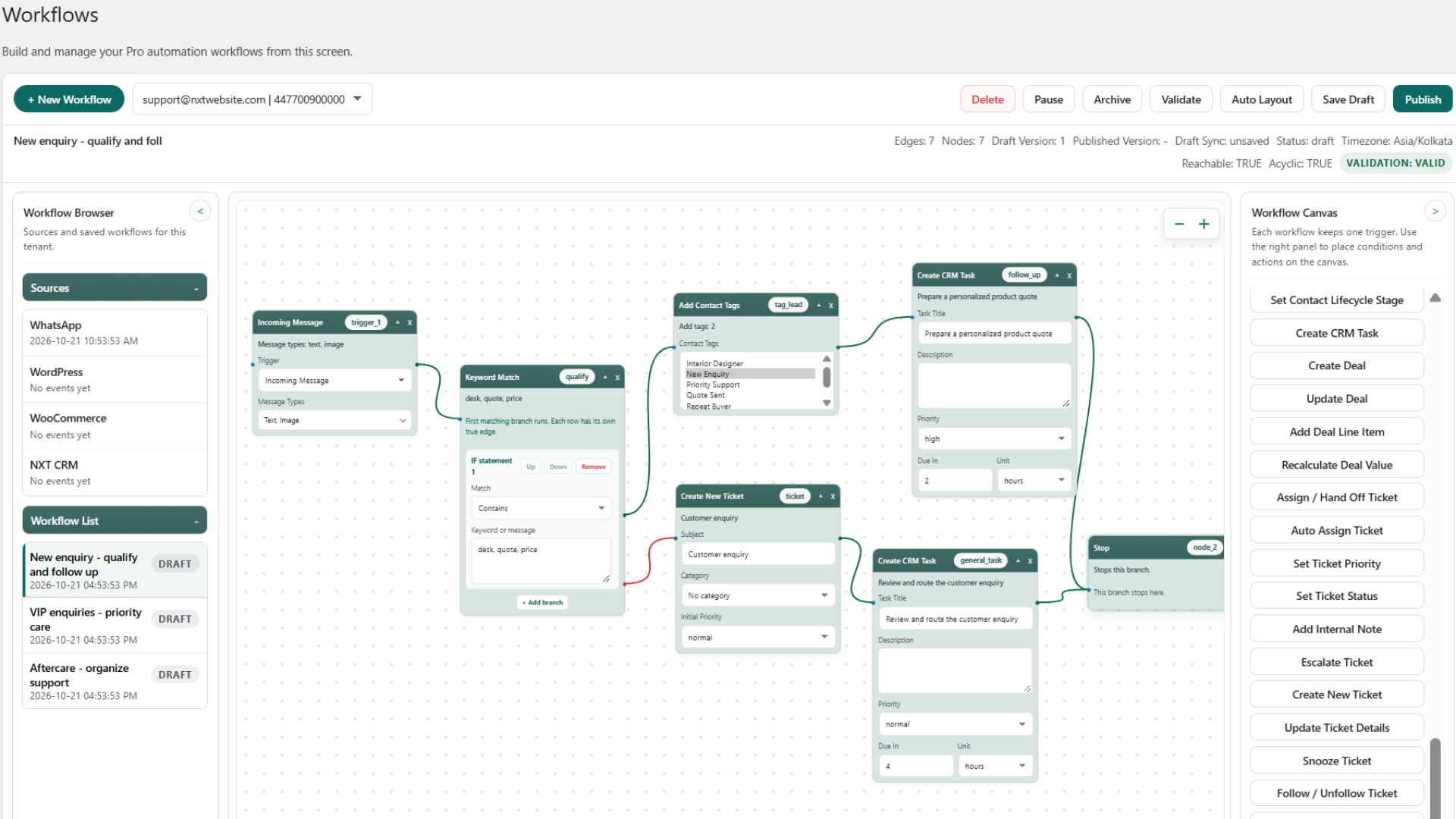
NXT Cloud Chat Pro visual workflow builder in WordPress admin showing an incoming message trigger, keyword branches, contact tags, tasks, and ticket actions
Build visual workflows in WordPressAvailable in Pro. Connect triggers, conditions, and CRM actions, then inspect each run separately from delivery.
NXT Cloud Chat contact profile with customer tags, lifecycle, linked deal, follow-up tasks, and CRM activity
Contact profile and activity timelineIncluded in Free. Keep the conversation, tasks, and sales context connected.
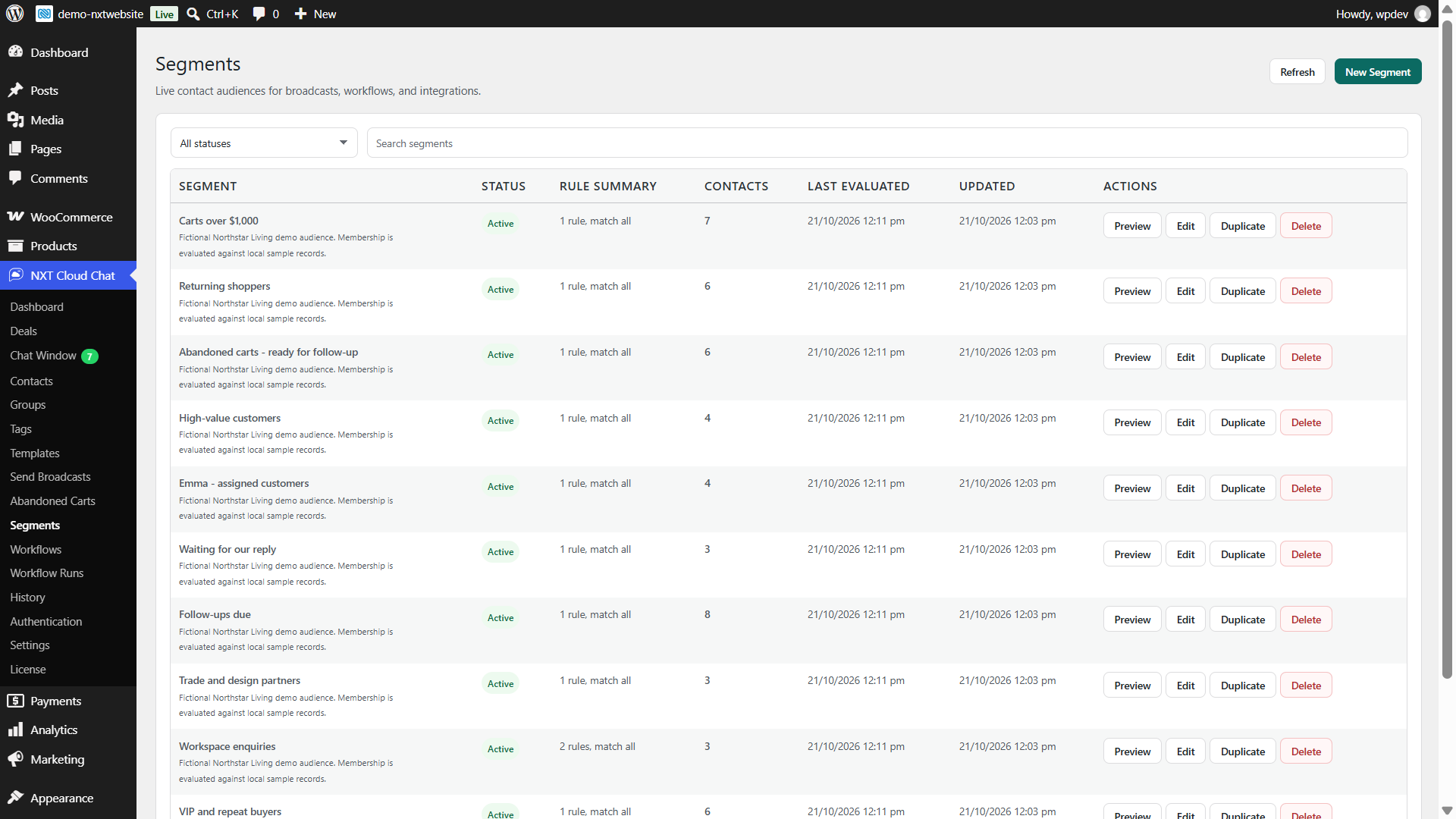
NXT Cloud Chat Pro Dynamic Segments for cart recovery, returning shoppers, high-value customers, and CRM follow-ups
Dynamic CRM and commerce audiencesAvailable in Pro. Preview matching contacts before targeting a campaign.
Pro Workflow Runs with separate execution outcomes, message delivery states, date filters, and selected run diagnostics
Workflow execution and message outcomesAvailable in Pro. Inspect run history without confusing execution with delivery.
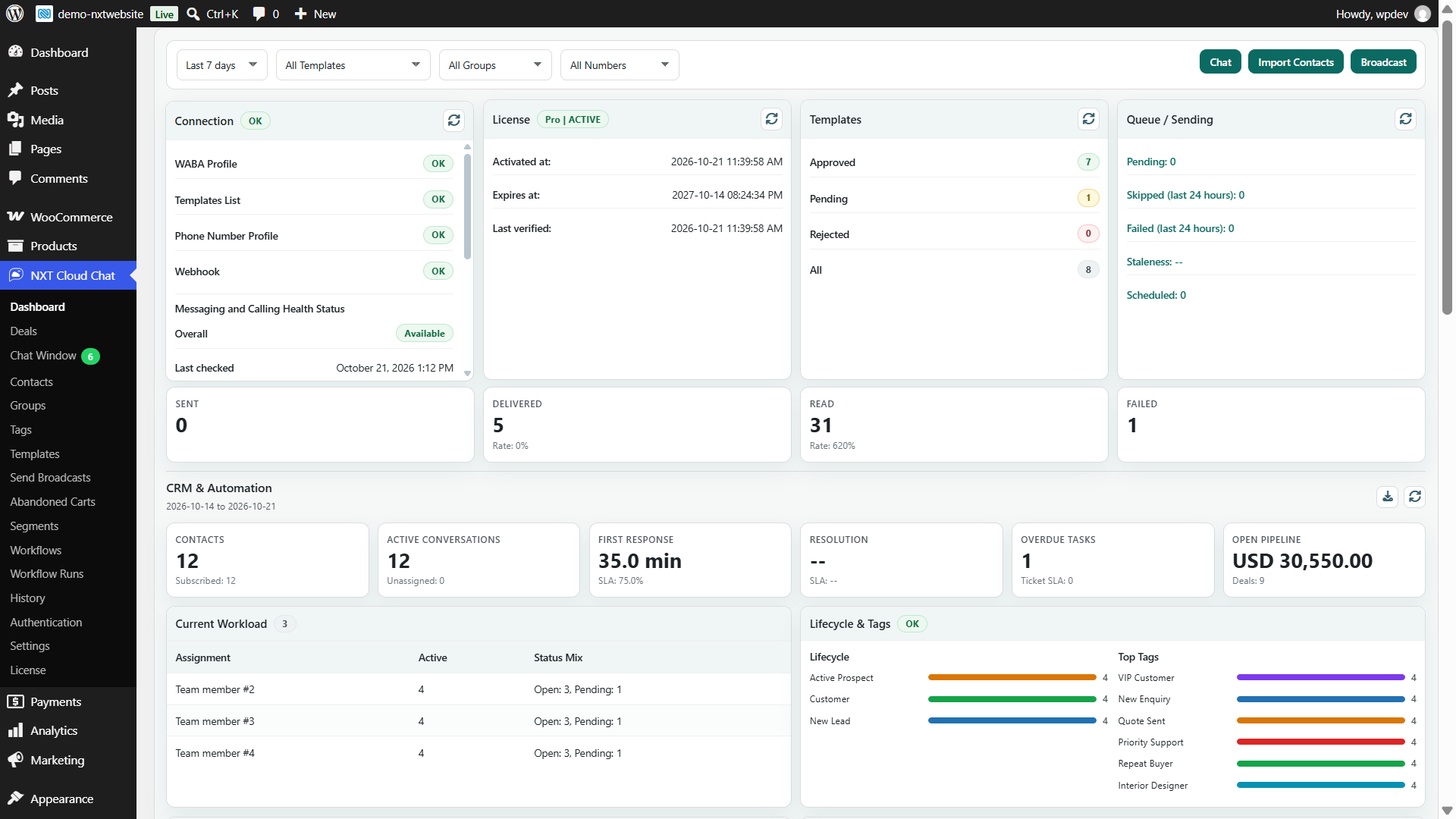
NXT Cloud Chat Pro dashboard showing connection health, current message status buckets, CRM workload, lifecycle, tags, and open deal value
CRM, messaging, and sales reportingPro adds advanced dashboard reports and selected-range aggregate CSV exports.

Screenshots contain fictional demo records. Connection health, template approvals, message states, and recovery results shown are simulated, not live customer results.

Compare editions

Compare Free with Free plus Pro.

Keep the same Free-owned customer records and permissions when you add Pro. The add-on extends the workspace rather than replacing it.

CapabilityFreeFree + Pro
Customer workspace
Shared inbox, media, replies, reactions, and agent views
Explicit tickets, private notes, handoffs, followers, and SLA
Contacts, profiles, groups, tags, tasks, lifecycle, and saved views
Duplicate detection, guarded merging, and activity timelines
Deals, pipelines, stage reasons, line items, and history
Access Teams, module permissions, and record scopes
WordPress/My Account OTP login and optional COD login checks
Session-bound browser alerts and optional previews
History, secure media, webhook checks, and connection health
Retention, cleanup preview, and opt-in uninstall deletion
Campaigns, workflows, and commerce
Template management, Meta sync, rich components, and individual sends
Scheduled broadcasts, personalization, queues, and retries
Dynamic Segments with CRM and WooCommerce rules
Visual workflows and multi-type incoming-message triggers
Workflow routing, SLA automation, and ticket escalations
CRM/deal actions, line-item changes, and value recalculation
WooCommerce order, verification, payment, and product-type workflows
Abandoned-cart tracking, recovery workflows, and analytics
Workflow Runs with separate execution and message diagnostics
Protected new workflow template parameter values
Advanced CRM/automation dashboard reports and CSV exports
Developer foundation
Tenant-scoped PHP wrappers, hooks, providers, and capability discovery
Public external workflow events and Pro integration wrappers

Pro requires Free and an active commercial license. Commerce features require WooCommerce. Both editions require WordPress 6.4+ and PHP 8.2+. Compatible external data sources depend on the integrations installed. Meta approval, opt-in rules, platform limits, and messaging charges apply separately.

WordPress-native

Your site stays at the center of the system.

NXT Cloud Chat is not a hosted inbox that happens to connect to WordPress. It is a WordPress CRM and messaging workspace that connects directly to the official Cloud API.

Data model

CRM records in WordPress

Contacts, messages, tickets, assignments, tasks, deals, and operational settings stay in your own WordPress database.

External connections

Meta delivery, optional Web Push

Your server uses your own Meta connection for WhatsApp messaging. Optional encrypted browser alerts use browser-vendor push services; previews are off by default.

Access policy

Permissions follow the record

Module permissions, assignment eligibility, and tenant-scoped assigned/team/all-record rules apply across customer records, media, imports, exports, and automation.

Developers and agencies

Stable integration contracts

Discover capabilities at runtime and use tenant-scoped PHP wrappers, hooks, contact-query providers, line-item providers, and compatible external workflow events.

Get connected

From installation to a working customer workspace.

Use your own Meta developer app, business account, phone number ID, and access token. The dashboard provides connection diagnostics, setup links, and access to the support portal.

Install Free

Use WordPress 6.4 or later and PHP 8.2 or later for both editions. Install Free from WordPress.org, then open NXT Cloud Chat settings.

Connect Meta

Add the App ID, App Secret, token, Phone Number ID, and Business / Messaging Account ID. Configure the callback and verify token, then run diagnostics.

Configure your workspace

Set teams, permissions, contacts, pipelines, retention, and OTP options. Install licensed Pro for automation; add WooCommerce for order and cart features.

Common questions

The important details, without the fine-print maze.

Clear answers about Free and Pro, browser alerts, customer privacy, workflow reporting, and data ownership.

What is included in Free, and when do I need Pro?

Free includes the inbox, tickets, contacts, groups, tags, tasks, lifecycle, deals, pipelines, team permissions, history, OTP login, and optional browser alerts. Pro requires Free plus an active commercial license and adds templates, broadcasts, Dynamic Segments, workflows, WooCommerce automation, recovery, and advanced reports. Licensed Pro updates use the normal WordPress Plugins update flow.

Can I use only WhatsApp OTP login?

Yes. Configure the Meta connection and authentication settings, then add

Login with WhatsApp

We'll send a one-time passcode via WhatsApp.

Try another sign-in method
Powered by NXT Cloud Chat
to a page. Optional buttons are available on the WordPress login page and WooCommerce My Account. You can link verified phone numbers and sync verified users into Contacts without actively using the CRM or inbox.

Do I need my own Meta account, and do messaging charges apply?

Yes. Connect your own Meta app and WhatsApp Cloud API credentials. Meta's messaging charges, template approvals, quality rules, opt-in requirements, and platform limits apply separately. NXT Cloud Chat does not charge per WhatsApp message. Review Meta's pricing.

Do chats or workflow ticket conditions create tickets automatically?

No. Create a ticket explicitly from the inbox panel or a configured Pro Create New Ticket action. Ordinary chat activity, ticket lookups, and ticket conditions do not create tickets. Pro validates ticket context before publishing; a creation action creates a separate ticket even when the contact already has an active one.

How do agent views differ from WhatsApp read receipts?

Agent views record unique WordPress users who visibly observe an incoming message in a focused chat, including first-view times. Polling, offscreen messages, and hidden tabs do not create views. These are separate from the customer's WhatsApp delivery and read receipts; shared inbox unread counts are not personal counters.

What stays private in the inbox?

Private notes are visible only to their author while that author retains access. Handoff notes are shared with authorized handlers. Pro can mask selected new outgoing template parameters from every Chat Window user, including administrators, while customers receive the original values. Masking does not change older history or incoming customer text; workflow configuration and direct database access are outside this boundary.

What does Web Push need, and does it require Pro?

Pro is not required. Each browser must opt in and grant permission. Web Push needs HTTPS, a supported browser, working WordPress cron, cURL, mbstring, and OpenSSL P-256 support. Previews are off by default. Chrome, Edge, Firefox, and Android Chrome have been tested; Safari and iPhone/iPad Home Screen delivery remain unverified for this release. Browser/OS restrictions can delay or suppress notifications, and service acceptance does not prove display.

What happens to notifications after logout or a long delay?

Logout revokes the matching WordPress session's enrollment; other signed-in sessions remain independent. A new login must opt in again. Messages from before enrollment are not replayed, and alerts expire after five minutes. Permissions, audience, session, and unread state are checked before sending. Already submitted notifications cannot be recalled and may remain visible on the device.

Do reports count message statuses cumulatively?

No. Message dashboard cards use independent current-status buckets: a message that moves from Sent to Delivered is counted under Delivered, not both. Reading and failures are separate outcomes. Workflow execution cards count runs, while delivery cards count messages. A successful run or an accepted message does not by itself confirm recipient delivery.

How are Dynamic Segments different from groups?

Groups store assigned contact membership. Pro Dynamic Segments evaluate live rules such as subscription, tags, lifecycle, ownership, tasks, conversations, dates, and optional WooCommerce activity. Preview audience counts, target current subscribed members in broadcasts, and check current membership in workflows.

Can this help with COD verification and cart recovery?

Free provides verified WhatsApp login and optional COD checkout login checks. With WooCommerce, Pro workflows can branch on payment method and current verification state, send approved confirmation/reminder templates, update registered order statuses, and create follow-up tasks. Abandoned carts have their own tracking and recovery tools. These support your process; they do not guarantee delivery, recovery, or reduced returns.

Where is data stored, and how can I remove it?

CRM and operational records stay in your WordPress database. WhatsApp delivery uses Meta, and optional encrypted alerts use browser-vendor push services. Retention includes a read-only cleanup preview, manual cleanup, and scheduled cleanup. Web Push retention supports 1-30 days while preserving active enrollments and keys. Uninstall data removal is opt-in and irreversible when enabled.


Bring your inbox, CRM, login, and automation into WordPress.

Start with Free for your inbox, customers, sales pipeline, and verified login. Add Pro for campaigns, workflows, WooCommerce recovery, and reporting.

NXT Cloud Chat Pro requires Free and an active commercial license. Meta platform charges and policies apply. Review official pricing.