Abandoned cart recovery with WhatsApp for WooCommerce helps store owners follow up with shoppers who added products to the cart but did not complete checkout. Instead of relying only on email reminders, your store can use approved WhatsApp templates to send timely, mobile-friendly cart recovery messages.
Cart abandonment is normal in ecommerce. Customers compare prices, get distracted, wait for salary day, face payment issues, or simply need a reminder. The opportunity is not to chase every visitor aggressively. The opportunity is to recover high-intent carts with clear, helpful, permission-aware messages.
In this guide, you will learn how WooCommerce abandoned cart recovery works with WhatsApp, what to include in recovery templates, how to use timing and segmentation, and how NXT Cloud Chat helps WooCommerce stores track abandoned carts and automate recovery flows.
What Is WhatsApp Abandoned Cart Recovery?
WhatsApp abandoned cart recovery is the process of detecting when a WooCommerce cart becomes stale and sending a WhatsApp reminder to the customer. The reminder can include a short message, product context, cart value, and a link back to checkout if your store supports it.
Because this is usually a promotional or re-engagement message, abandoned cart reminders generally fit the Marketing template category. This means your template should be approved, clear, and sent only to eligible customers.
Why Use WhatsApp Instead of Only Email?
Email abandoned cart reminders are useful, but many shoppers ignore promotional email or see it too late. WhatsApp is more direct and personal, so the message must be used carefully. A short, respectful reminder can perform well because it reaches the customer where they already communicate.
- WhatsApp is easier to notice on mobile.
- Messages can feel more personal than email.
- Customers can return to checkout quickly.
- High-value carts can receive faster follow-up.
- Store owners can combine cart recovery with segmentation and workflows.
The key is restraint. One useful message at the right time is better than several pushy reminders.
How NXT Cloud Chat Tracks Abandoned Carts
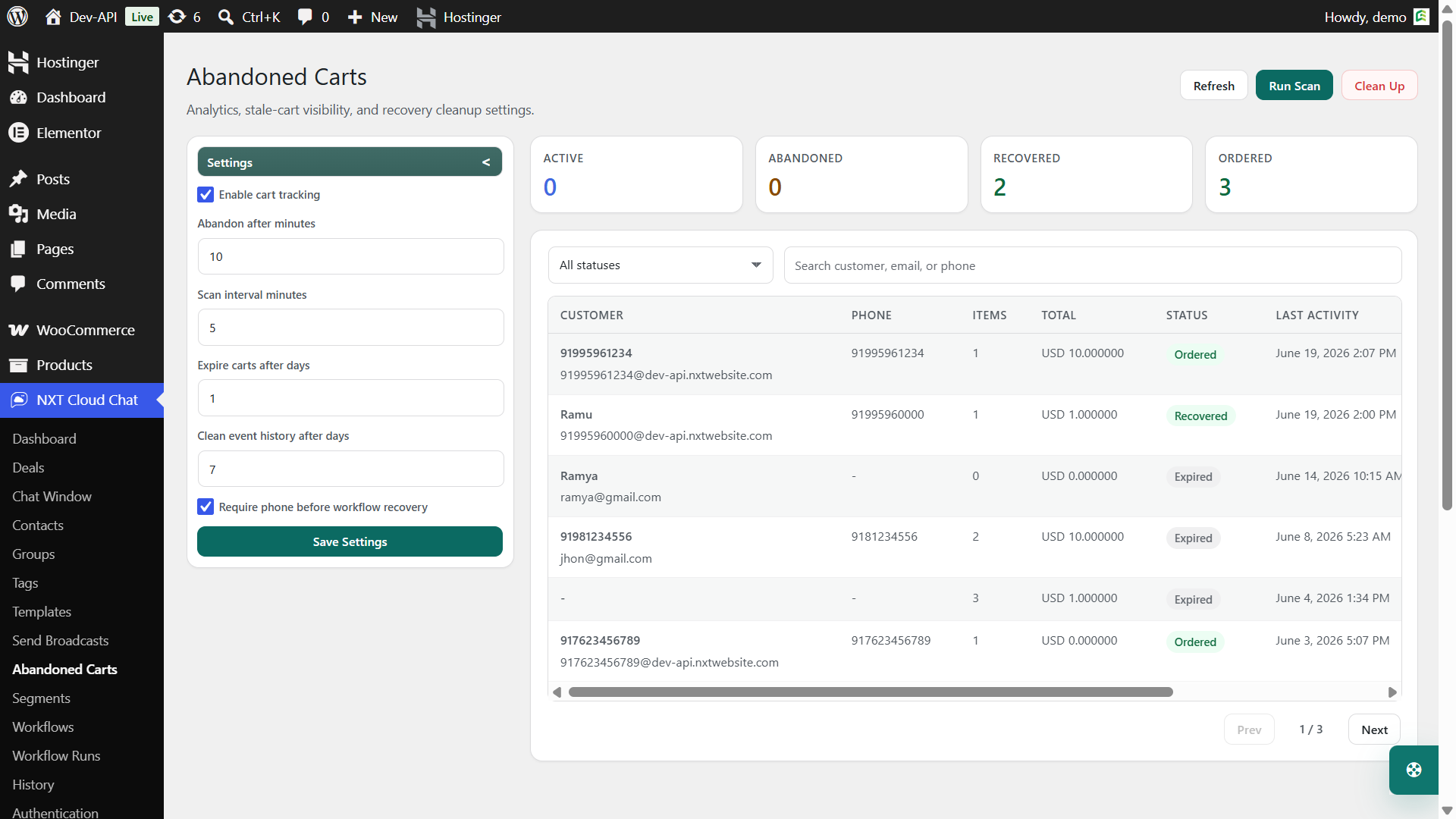
NXT Cloud Chat Pro adds a WooCommerce abandoned cart recovery module that tracks cart activity and helps identify carts that become stale. Administrators can review cart value, customer context, abandonment time, and recovery state from a dedicated table.
The abandoned cart system uses practical cart states so store owners can understand what happened:
- Active – the cart is still active and not yet stale.
- Abandoned – the cart crossed the stale threshold and may be eligible for recovery.
- Recovered – the customer returned and recovered the cart.
- Ordered – the cart resulted in an order.
- Expired – the cart is no longer useful for recovery.
You can also configure stale-cart thresholds, retention periods, scan controls, and cleanup settings so the module fits your store’s order volume.
What Should an Abandoned Cart WhatsApp Message Say?
A good abandoned cart message should be short, friendly, and easy to act on. It should not feel like pressure. The best messages remind the customer what they were doing and make it simple to continue.
Hi {{1}}, you left items in your cart at {{2}}. You can complete your order here: {{3}}
You can personalize the message with approved template variables such as customer name, store name, cart value, product summary, or cart link depending on your available template and workflow context.
Recommended Recovery Timing
Timing depends on your product type, price, and customer behavior. A low-cost impulse product can use a faster reminder. A high-value product may need more breathing room.
| Timing | Use case | Message style |
|---|---|---|
| 30 minutes to 2 hours | Fast-moving products, limited stock, common checkout drop-offs | Simple reminder |
| 6 to 12 hours | Most general WooCommerce stores | Helpful cart reminder |
| 24 hours | Higher-value products or considered purchases | Supportive reminder with reason to return |
| 2 to 3 days | Optional final reminder for eligible subscribers | Gentle follow-up or offer |
Start with one reminder first. After you measure results, decide whether your store needs a second reminder or a different message for high-value carts.
Example Workflow for Abandoned Cart Recovery
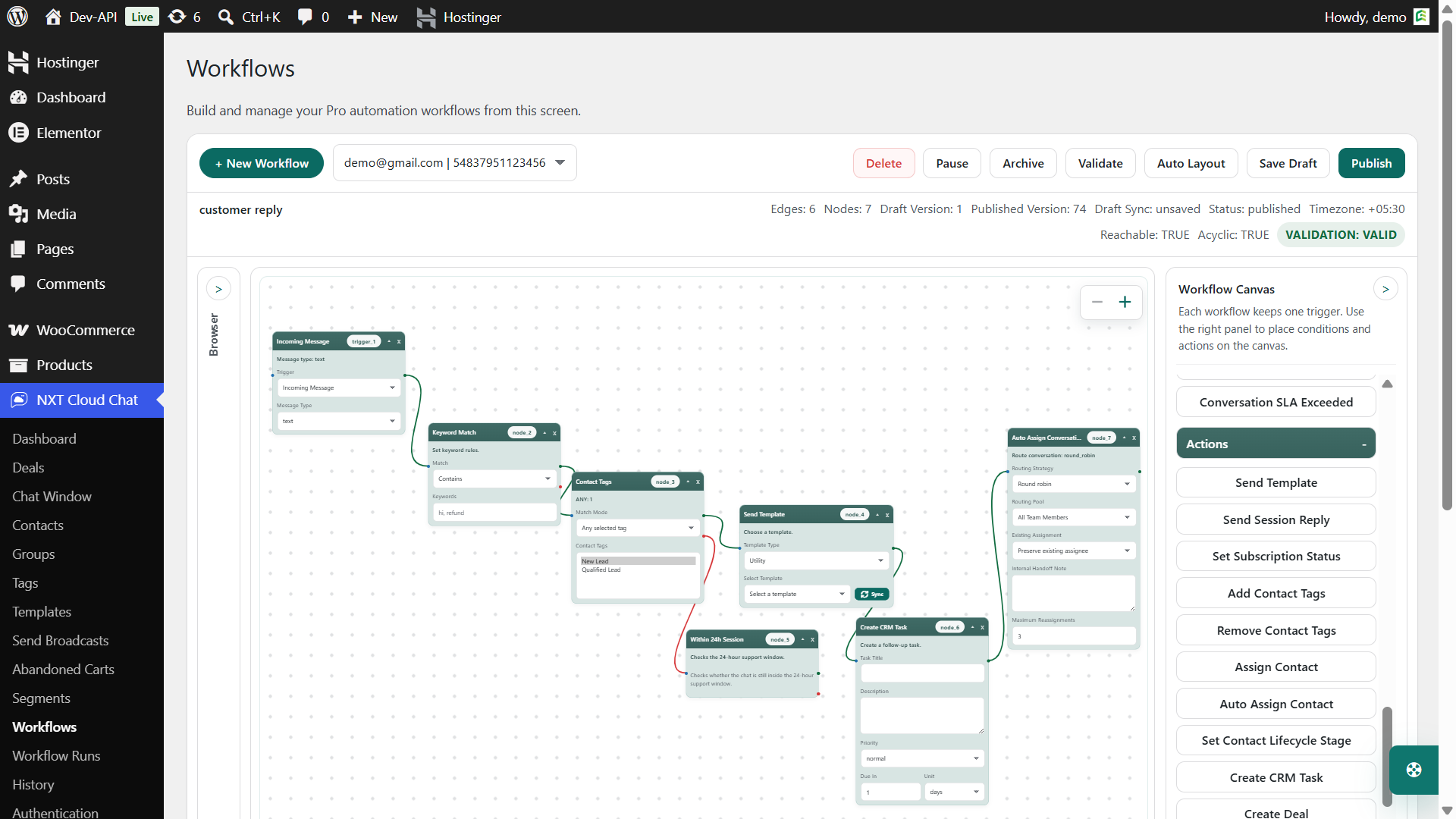
NXT Cloud Chat Pro includes a WooCommerce Cart Abandoned workflow trigger. That means a cart can become the starting point for an automated WhatsApp recovery flow.
- Trigger: WooCommerce cart abandoned.
- Condition: Contact subscription status allows marketing messages.
- Condition: Cart value is greater than your minimum recovery value.
- Condition: Product or category matches the recovery campaign, if needed.
- Action: Send approved WhatsApp Marketing template.
- Review: Check abandoned cart status and workflow runs.
Use Segments for Smarter Recovery
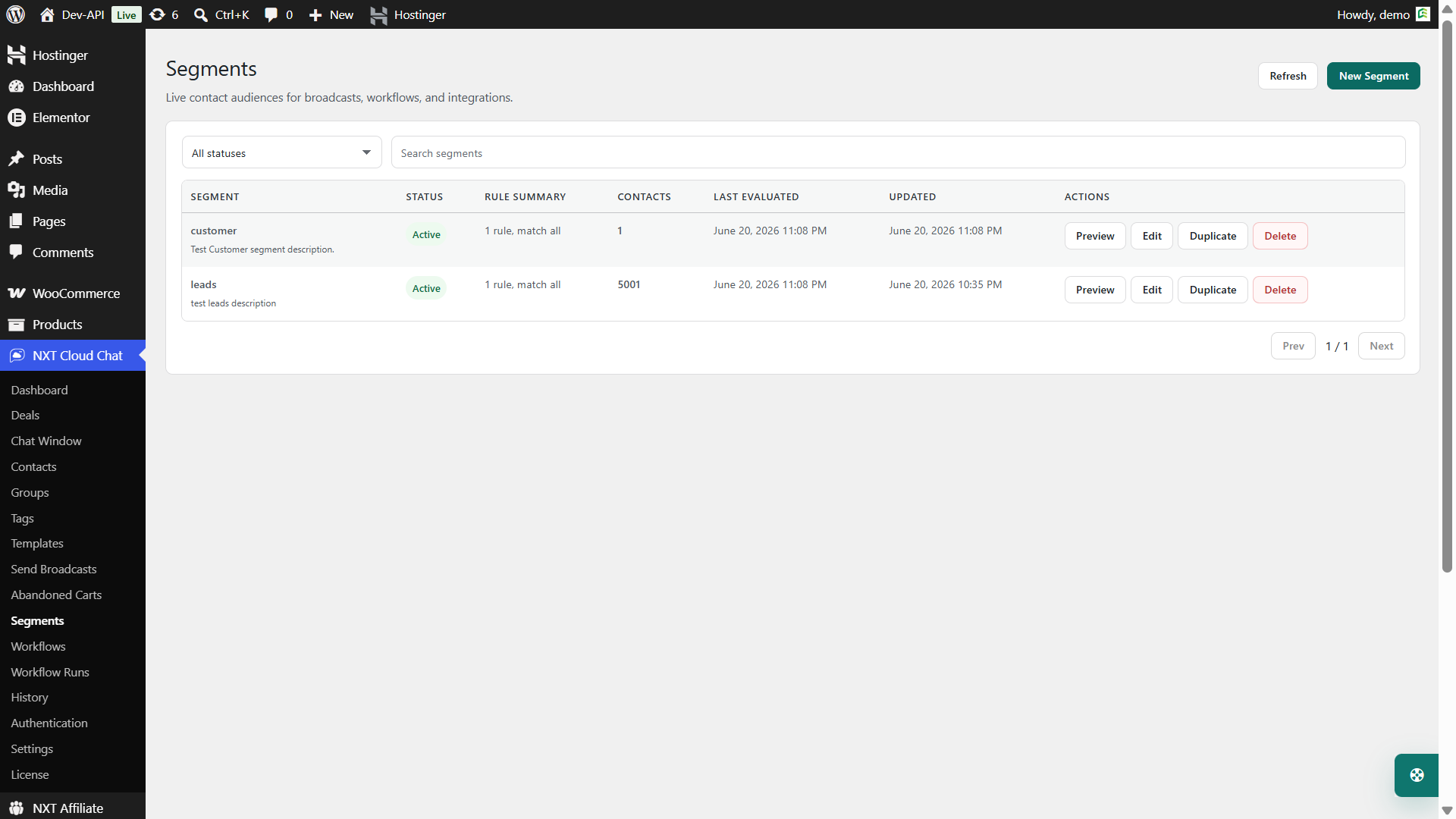
Not every abandoned cart should receive the same message. With dynamic segments in NXT Cloud Chat Pro, you can organize contacts based on CRM and WooCommerce rules such as order value, order count, products, categories, coupons, refunds, statuses, and abandoned cart activity.
This opens better recovery strategies:
- Send a different reminder to first-time shoppers and repeat customers.
- Prioritize high-value abandoned carts.
- Exclude customers who recently purchased.
- Target specific product categories.
- Keep campaign audiences cleaner and more relevant.
Abandoned Cart Template Best Practices
- Keep it short. The customer should understand the message in a few seconds.
- Use a clear call to action. If you include a link, make the next step obvious.
- Do not overuse discounts. If every reminder has a coupon, customers may learn to abandon carts intentionally.
- Respect subscription status. Recovery campaigns should not be sent to unsubscribed contacts.
- Avoid too many reminders. One or two useful reminders are usually better than repeated messages.
- Match the category correctly. Abandoned cart messages are usually Marketing templates.
How to Measure Recovery Performance
Abandoned cart recovery should be measured, not guessed. Inside NXT Cloud Chat Pro, abandoned cart analytics and the cart table help you understand cart status and recovery behavior. Workflow runs help you inspect whether automation actually executed.
- How many carts became abandoned?
- How many recovery messages were sent?
- How many carts became recovered or ordered?
- Which products or categories abandon most often?
- Which templates or timing windows perform best?
These answers help you improve the cart page, checkout process, shipping clarity, payment options, and message timing.
Common Mistakes to Avoid
- Sending recovery messages without a clear opt-in or subscription strategy.
- Using a Utility template for a promotional cart reminder.
- Sending too many reminders too quickly.
- Ignoring cart value and sending low-value reminders that do not justify the cost.
- Not checking whether the customer already completed an order.
- Failing to monitor workflow runs and abandoned cart statuses.
Why NXT Cloud Chat Is Useful for Cart Recovery
NXT Cloud Chat Pro brings the abandoned cart workflow into WordPress instead of making store owners manage recovery from a separate disconnected system. The same plugin can handle template sync, contact subscription state, WooCommerce cart tracking, recovery workflows, dynamic segments, and execution logs.
That combination is important because abandoned cart recovery is not only about sending a message. It is about knowing when the cart became stale, whether the customer is eligible, which template should be sent, and whether the recovery attempt worked.
If your WooCommerce store wants a WordPress-native way to recover carts with WhatsApp, NXT Cloud Chat gives you the core tools to build that system.
Frequently Asked Questions
Can WooCommerce send abandoned cart reminders on WhatsApp?
Yes. With NXT Cloud Chat Pro, WooCommerce abandoned carts can be tracked and used as workflow triggers for approved WhatsApp template messages.
Which template category should abandoned cart messages use?
Abandoned cart reminders are usually Marketing templates because they are re-engagement or promotional messages.
How many abandoned cart WhatsApp reminders should I send?
Start with one helpful reminder. If your store has enough volume, test a second reminder later. Avoid sending too many messages, because it can reduce trust and increase unsubscribes.
Can I target only high-value abandoned carts?
Yes. You can design workflows and segments around cart value, products, categories, and customer context so recovery messages are more targeted.
Does WhatsApp cart recovery replace email recovery?
Not always. Many stores use both. WhatsApp can be used for high-intent or high-value carts, while email can handle longer explanations, product details, and lower-priority reminders.