A WhatsApp workflow builder for WordPress helps website owners automate customer communication without writing custom code. Instead of manually sending every message, your site can react to events such as incoming messages, WooCommerce order changes, abandoned carts, CRM updates, ticket changes, or login activity.
Automation is powerful, but only when it is built carefully. A good workflow should have a clear trigger, logical conditions, and actions that make sense for the available customer context. That is why a visual workflow builder can be useful for WordPress teams: the logic is visible before it is published.
In this guide, you will learn how WhatsApp workflow automation works in WordPress, what triggers and conditions to use, and how NXT Cloud Chat Pro helps build visual WhatsApp automation flows for WooCommerce, CRM, support, broadcasts, and abandoned cart recovery.
What Is a WhatsApp Workflow?
A WhatsApp workflow is an automation that starts from an event, checks rules, and performs actions. For example, a WooCommerce order status change can trigger a workflow that sends an approved Utility template to the customer.
- Trigger: The event that starts the workflow.
- Condition: A rule that decides which path should run.
- Action: The work the workflow performs.
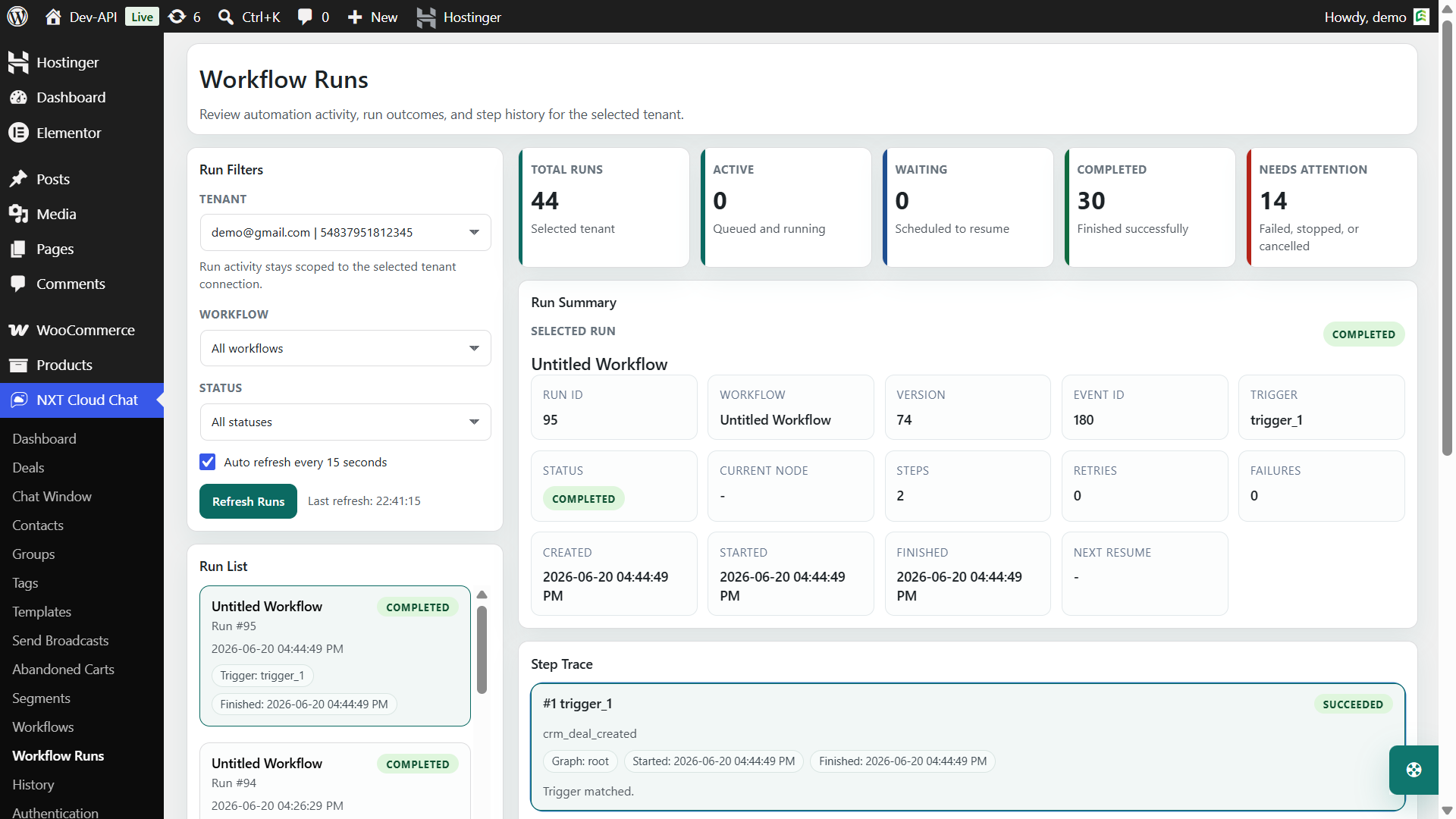
- Run history: The log that shows what happened when the workflow executed.
Why Use a Visual Builder?
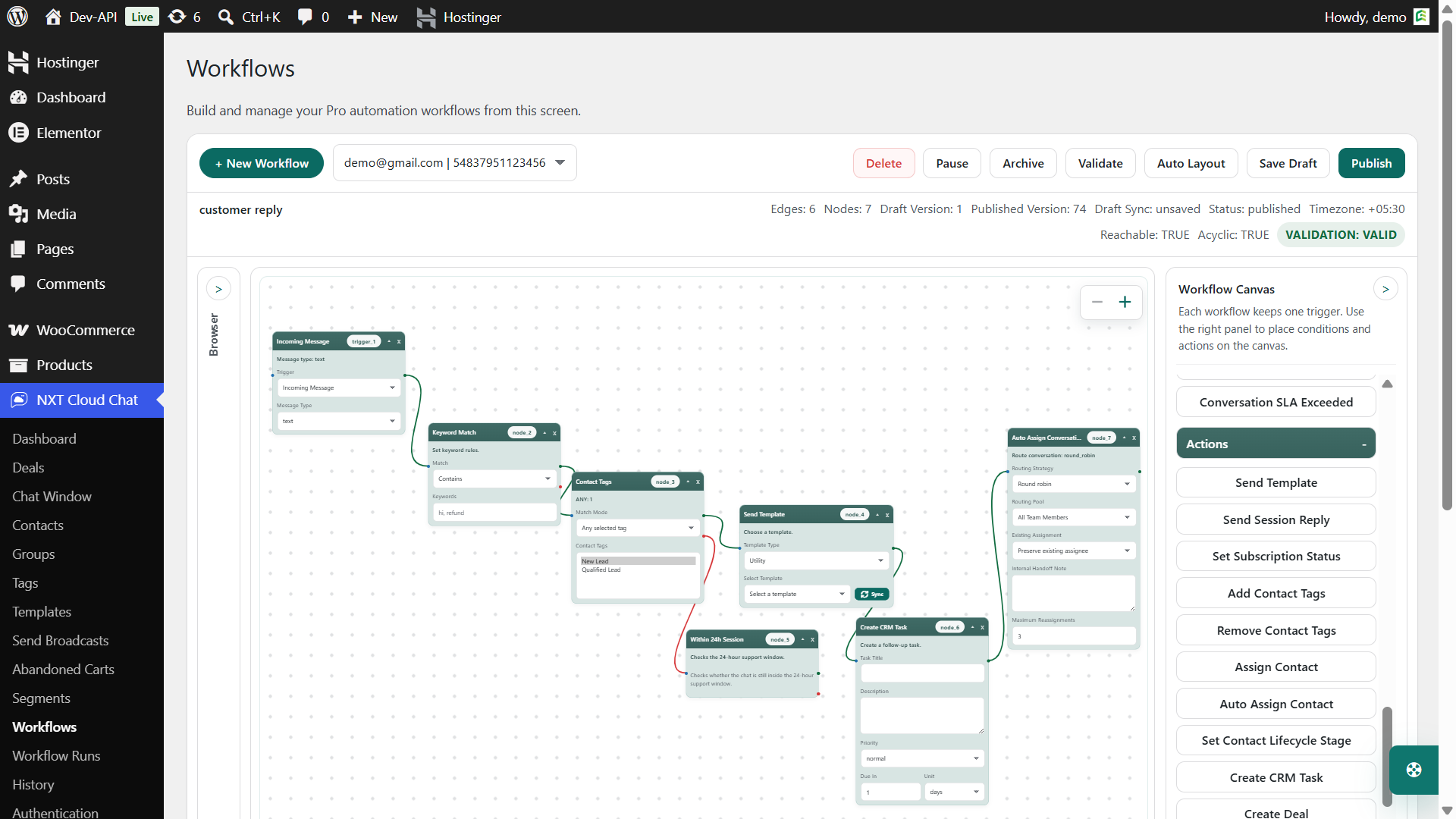
Visual workflow builders make automation easier to understand. You can see where the flow starts, what conditions it checks, and which actions run next. This is especially helpful for store owners and support teams who are not developers.
With NXT Cloud Chat Pro, workflow nodes are connected visually. The builder supports triggers, conditions, actions, branches, and validation so administrators can reduce mistakes before publishing.
Common Workflow Triggers
A workflow should start from one clear trigger. This keeps the logic predictable and easier to debug.
| Trigger idea | Use case |
|---|---|
| Incoming WhatsApp message | Route or respond based on message content |
| WooCommerce order event | Send order or payment updates |
| Order status changed | Notify customer when order moves to a key stage |
| Cart abandoned | Send recovery template to eligible contacts |
| Ticket updated | Trigger internal or customer follow-up |
| Contact or CRM event | Tag, assign, or route customer activity |
Useful Workflow Conditions
Conditions make workflows safer and more targeted. Instead of sending the same message to every customer, conditions help the workflow check whether the message is appropriate.
- Contact subscription status
- Contact tag or group
- Dynamic segment membership
- WooCommerce order status
- Product or category match
- Cart value or cart context
- Ticket status, priority, or assignment
- Keyword match with multiple branches
For example, an abandoned cart flow can check whether the customer is subscribed, whether the cart value is high enough, and whether the product category matches the recovery campaign before sending a template.
Useful Workflow Actions
Actions perform the actual work. In a WhatsApp automation system, the most common action is sending an approved template. But a CRM workflow may also assign contacts, update tags, route tickets, or change customer state.
- Send approved WhatsApp template
- Add or remove contact tag
- Change contact subscription status
- Assign contact or ticket to a user or team
- Add internal note
- Update ticket status or priority
- Trigger CRM follow-up
Workflow Examples for WordPress and WooCommerce
WooCommerce Order Update
- Trigger: Order status changed.
- Condition: New status is processing, shipped, completed, or a supported custom status.
- Action: Send approved Utility template.
Abandoned Cart Recovery
- Trigger: WooCommerce cart abandoned.
- Condition: Contact is subscribed and cart value matches your threshold.
- Action: Send approved Marketing template.
Ticket Handoff
- Trigger: Ticket assigned or handed off.
- Condition: Priority is high or SLA is at risk.
- Action: Add internal note or route to the right team.
Validation Matters Before Publishing
A good workflow builder should not allow impossible flows to go live. For example, a workflow that starts from an incoming message should not assume WooCommerce cart context unless that context is actually available. A ticket action should require ticket context. A template variable should resolve from the current flow data.
NXT Cloud Chat Pro includes validation so workflows can be checked before publishing. This helps reduce broken automation, missing context, invalid branches, and failed template sends.
Use Workflow Runs for Debugging
Workflow automation should be traceable. If a message fails, you need to know whether the trigger fired, the condition matched, the customer was eligible, the template was valid, or the API returned an error.
Best Practices
- Start each workflow with one clear trigger.
- Use conditions to protect customers from irrelevant messages.
- Use approved templates in the correct category.
- Respect subscription status for marketing automation.
- Test with real data before publishing widely.
- Review workflow runs after launch.
Why NXT Cloud Chat Pro Is a Strong Fit
NXT Cloud Chat Pro is not only a message sender. Its workflow builder connects WhatsApp templates with WordPress, WooCommerce, CRM, tickets, contacts, carts, and segments. That makes it useful for businesses that want automation tied to real website context.
If your WordPress site needs WhatsApp automation that is visible, testable, and connected to WooCommerce data, NXT Cloud Chat Pro gives you a practical visual workflow builder inside WordPress.
Frequently Asked Questions
Can WordPress automate WhatsApp messages?
Yes. With NXT Cloud Chat Pro and the official WhatsApp Cloud API, WordPress can automate approved template messages based on triggers, conditions, and actions.
Can WooCommerce order changes trigger WhatsApp messages?
Yes. NXT Cloud Chat Pro supports WooCommerce order events and order status logic inside workflows.
Can abandoned carts trigger WhatsApp workflows?
Yes. NXT Cloud Chat Pro includes a WooCommerce Cart Abandoned trigger and cart context for recovery workflows.
Do workflow messages need templates?
Most business-initiated workflow messages need approved WhatsApp templates. Use Authentication, Utility, or Marketing templates based on the message purpose.