WooCommerce WhatsApp CRM helps store owners manage customers, conversations, orders, carts, support, and follow-up in one place. Instead of treating WhatsApp as only a message channel, a CRM approach turns WhatsApp communication into part of the customer relationship.
For WooCommerce stores, this matters because every customer message has context. A buyer may ask about an order, abandon a cart, need login help, request support, respond to a broadcast, or return later for another purchase. A good WhatsApp CRM should help your team understand that context quickly.
In this guide, you will learn what a WooCommerce WhatsApp CRM should include, how it improves store operations, and how NXT Cloud Chat brings CRM, inbox, contacts, login, automation, and WooCommerce messaging into WordPress.
What Is a WooCommerce WhatsApp CRM?
A WooCommerce WhatsApp CRM is a system that connects WhatsApp communication with customer records and ecommerce activity. It should help your team answer questions, organize contacts, track follow-up, and send the right message at the right time.
- Customer contact details
- WhatsApp chat history
- Tags, groups, subscription status, and lifecycle
- Order and cart context
- Tickets, assignments, and internal notes
- Broadcast and workflow activity
Why WooCommerce Stores Need CRM, Not Just Notifications
Order notifications are useful, but they are only one part of customer communication. A store also needs to understand who the customer is, what they bought, whether they subscribed, whether they need support, and what the team should do next.
Without CRM, WhatsApp messages can become scattered. One admin sends a reply, another sends a campaign, and a third person cannot see the full context. CRM prevents that confusion.
Core Features to Look For
1. CRM Inbox
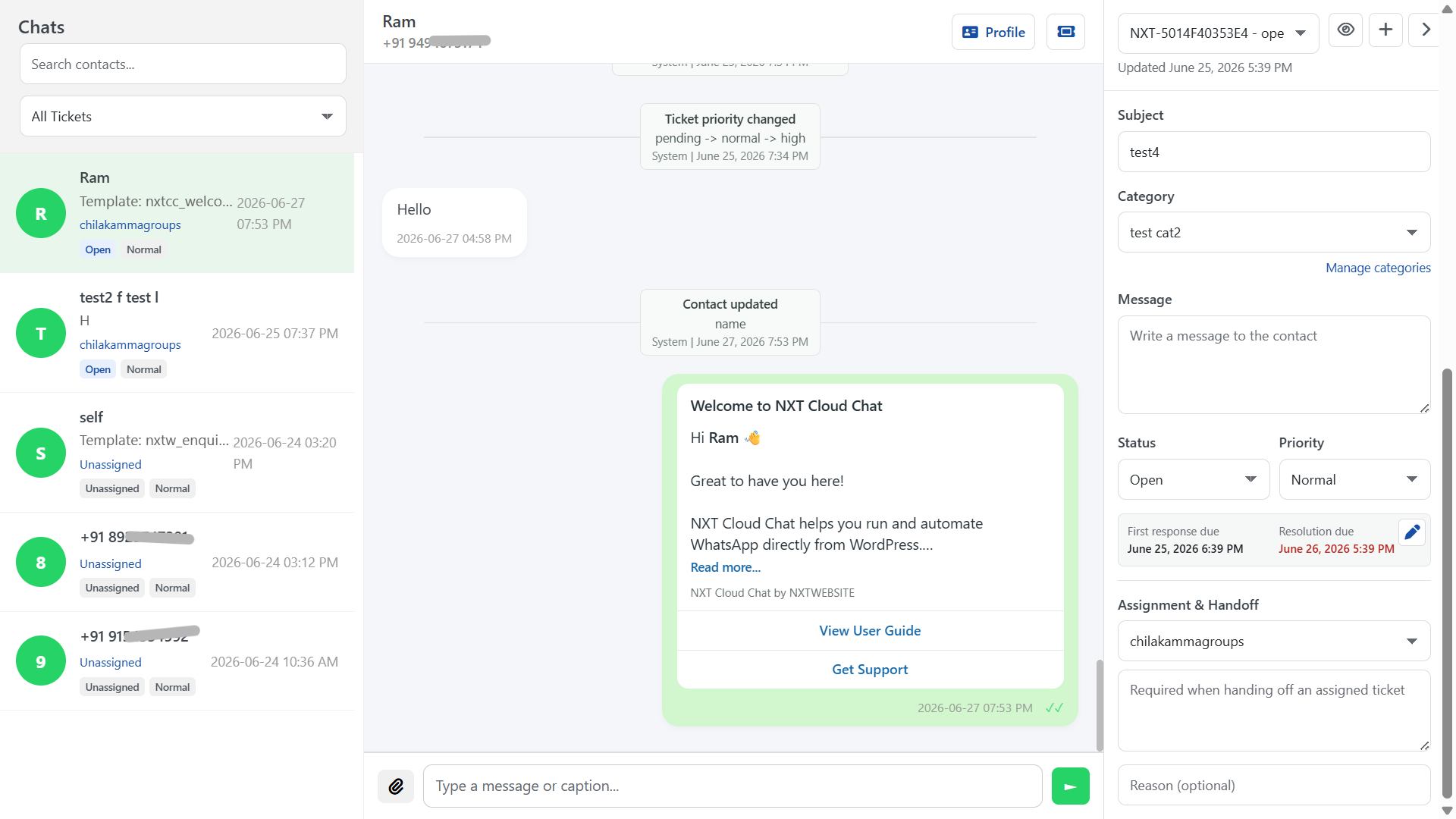
Your team should be able to read and respond to WhatsApp messages inside WordPress. The inbox should show the conversation, customer profile, timeline, ticket activity, and assignment context.
2. Contacts, Tags, and Groups
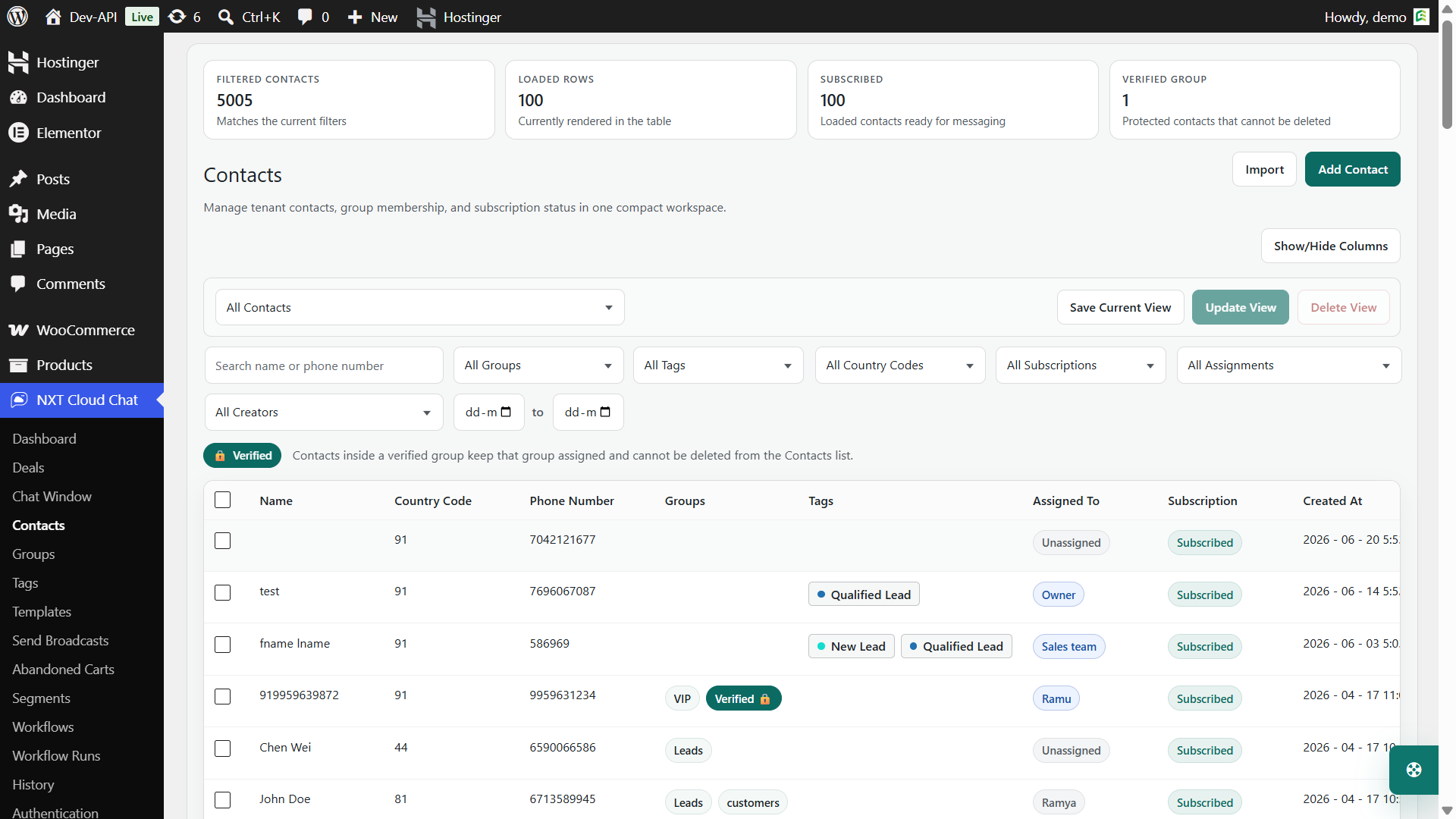
Contacts should be easy to organize. Tags can mark behavior or status. Groups can organize audience lists. Subscription status should be clear so marketing messages are sent responsibly.
3. Tickets and Assignments
When a customer issue needs follow-up, it should not disappear inside a chat thread. Tickets, assignments, handoff notes, and internal notes help teams manage support more carefully.
4. WooCommerce Order and Cart Context
A WooCommerce CRM should understand orders and carts. Support teams should not have to open five browser tabs just to know whether the customer has an active order, abandoned cart, payment issue, or previous purchase.
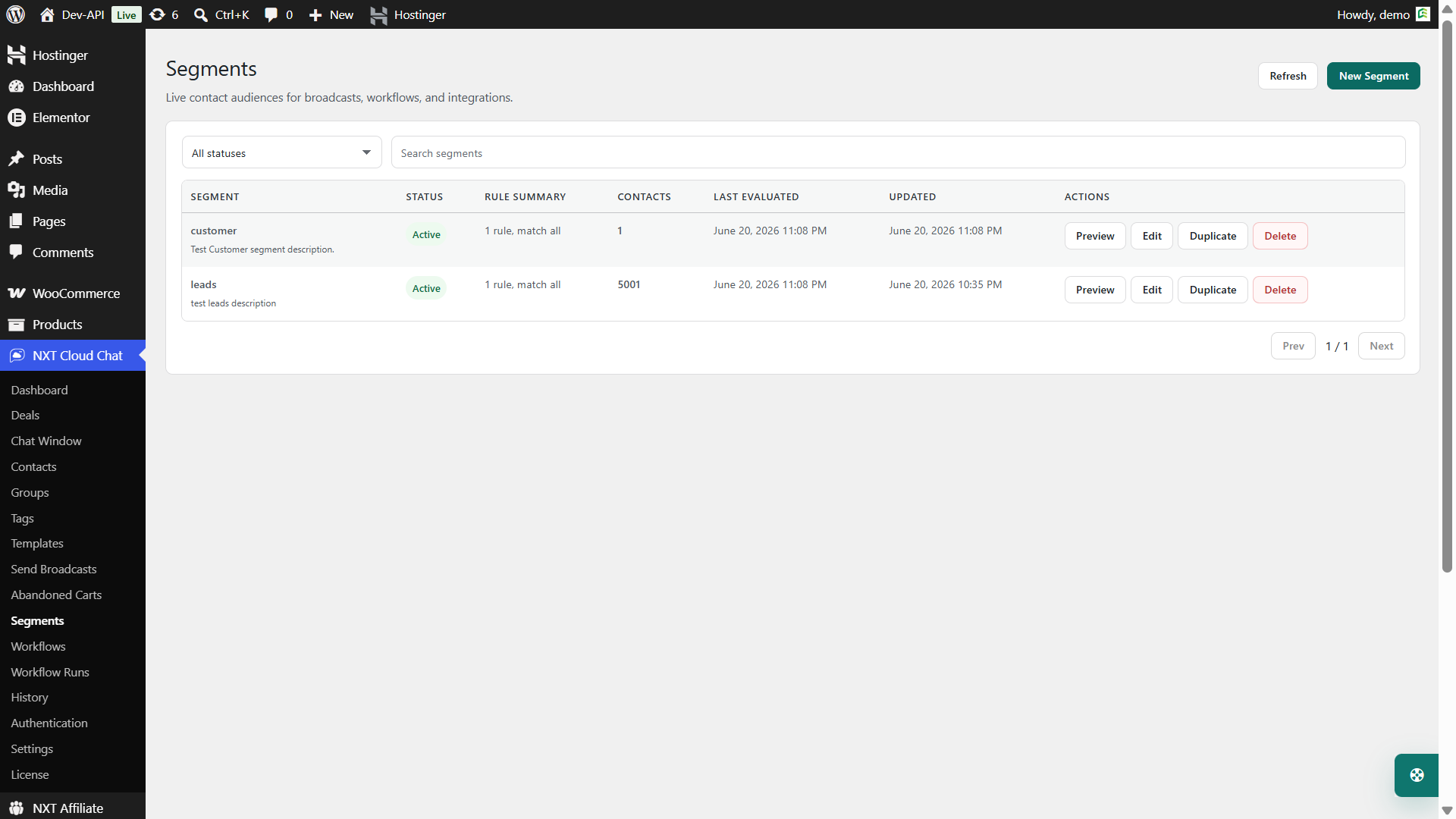
5. Templates, Broadcasts, and Segments
As the business grows, the CRM should support approved WhatsApp templates, broadcasts, and targeted segments. NXT Cloud Chat Pro adds template sync, Send Broadcasts, and dynamic segments using CRM and WooCommerce filters.
6. Visual Workflow Automation
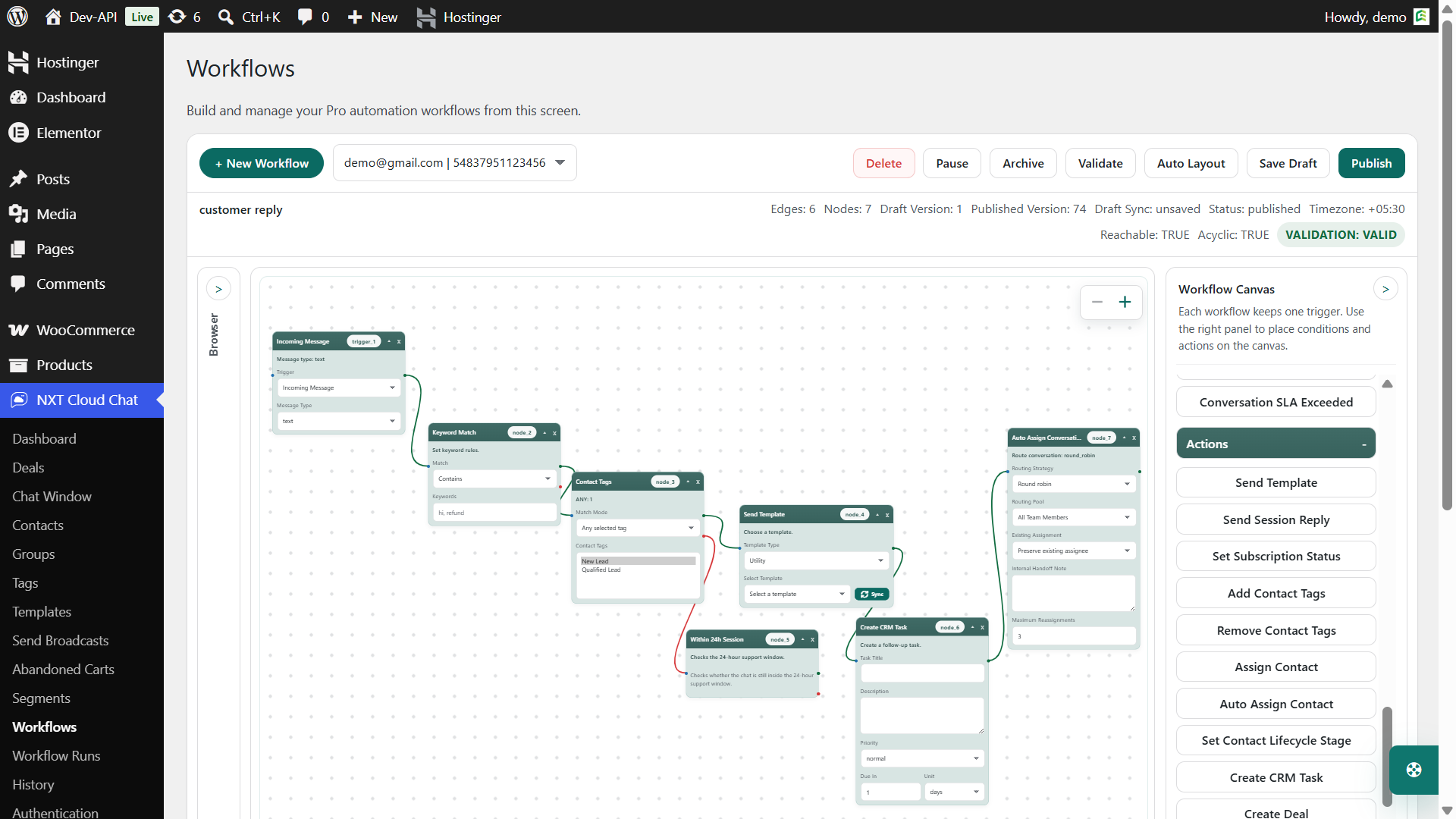
Workflow automation helps your CRM respond to customer events. For example, an order status can trigger a Utility template, an abandoned cart can trigger a Marketing template, or a ticket update can trigger an internal workflow action.
How NXT Cloud Chat Supports WooCommerce CRM
NXT Cloud Chat is designed for WordPress businesses that want WhatsApp to be part of their CRM workflow. The free plugin gives you the foundation, while Pro adds advanced automation and ecommerce messaging.
| Need | NXT Cloud Chat support |
|---|---|
| Customer inbox | WordPress chat window with customer context |
| Contact organization | Contacts, groups, tags, lifecycle, history |
| Team workflow | Team access, assignments, notes, tickets |
| Login verification | WhatsApp OTP login for WordPress and WooCommerce |
| WooCommerce updates | Pro workflows for order events and template messages |
| Cart recovery | Pro abandoned cart table, statuses, analytics, and workflow trigger |
| Marketing | Pro broadcasts, dynamic segments, approved templates |
Example WooCommerce CRM Workflows
- New order support: Send an order confirmation template and tag the customer as a buyer.
- Abandoned cart recovery: Detect stale carts and send an approved Marketing template to eligible contacts.
- VIP segmentation: Build a dynamic segment based on order value or order count.
- Support handoff: Assign a ticket to a team member with an internal note.
- COD verification: Require WhatsApp OTP login before WooCommerce COD checkout continues.
Best Practices
- Keep contact data clean and avoid duplicate records.
- Use tags for behavior, not random labels.
- Use groups for stable audiences and segments for dynamic rules.
- Respect subscription status for marketing messages.
- Use Utility templates for order updates and Marketing templates for campaigns.
- Review workflow runs to troubleshoot automation issues.
Final Recommendation
A WooCommerce WhatsApp CRM should do more than send messages. It should help your store understand customers, organize communication, support the team, and automate the right follow-up at the right time.
If your store wants WhatsApp inbox, CRM, login, contacts, tags, groups, tickets, deals, segments, templates, broadcasts, WooCommerce order automation, and abandoned cart recovery inside WordPress, NXT Cloud Chat is built for that direction.
Frequently Asked Questions
What is a WooCommerce WhatsApp CRM?
It is a CRM system that connects WhatsApp conversations with WooCommerce customer, order, cart, support, and marketing context.
Does NXT Cloud Chat include a WhatsApp inbox?
Yes. NXT Cloud Chat includes a CRM-style chat window for WordPress, with contact context and team workflow tools.
Can it recover WooCommerce abandoned carts?
NXT Cloud Chat Pro includes abandoned cart tracking, cart statuses, analytics, cleanup settings, and a workflow trigger for recovery messages.
Can I send broadcasts from the CRM?
Yes. NXT Cloud Chat Pro supports broadcasts using approved templates to contacts, groups, and dynamic segments.